
ApiMate vs Hextom
Compared as of 2026-09-14 · Hextom source
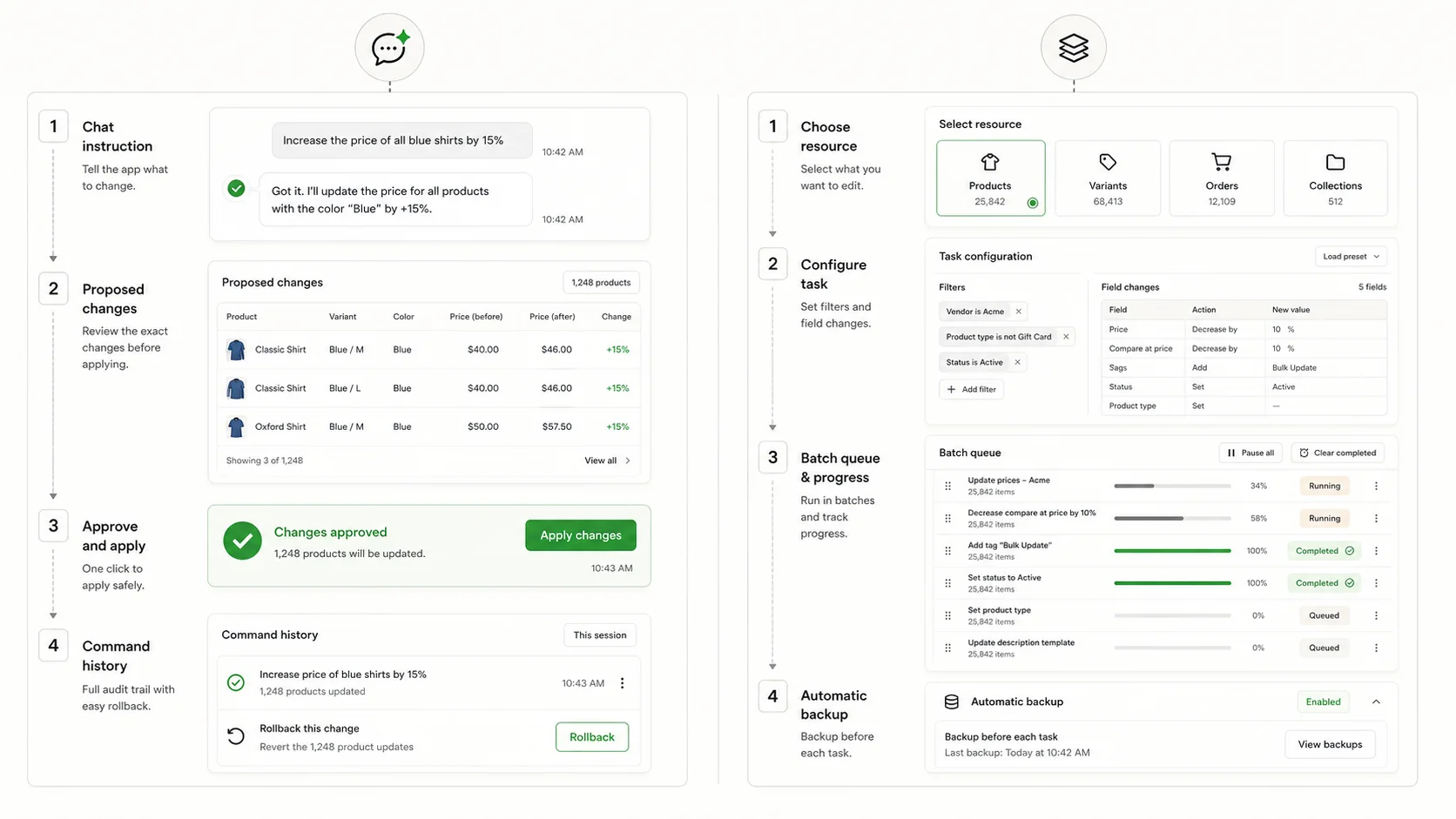
Hextom Bulk Product Edit is the budget classic: a task builder that covers products, variants, collections, orders and metafields, with the lowest paid tier of the well-known editors and per-task product caps that step up by plan. ApiMate is a chat that turns a sentence into a previewed write. They overlap on most product jobs and differ on price shape, scale shape, and where the thinking happens.
| Feature | ApiMate | Hextom |
|---|---|---|
| Starting point | A sentence in chat | A task with filters and target values |
| Preview | Every row: current, new, reason in scope | Task summary and target list |
| Approval before write | Required on every write | Run the task after configuring it |
| Undo | Per job from history; saved values | Reversion within a 30 to 180 day backup window by plan |
| Products per job | No cap; estimate shown before the run | 500 Basic, 5,000 Professional, 50,000 Advanced |
| Scheduling | Not the lead use case | Yes, on paid plans |
| Orders | Reads and writes in the same chat | Order tasks: tags, notes, status |
| Generated text | Per row, previewed | Find and replace, templates |
| Free plan | Yes; audits and small jobs on any catalog size | Yes, 10 products per task |
| Paid entry | See pricing | $9.99/mo Basic, $19.99 Professional, $49.99 Advanced |
| App Store | See App Store | 4.9, over a thousand reviews, one of the oldest listings |
| Best fit | Different request each time, previewed | Repeating large batches on the lowest tier |
What Hextom is
Hextom Bulk Product Edit is one of the oldest bulk editors on the Shopify App Store, and the listing shows it: over a thousand reviews at 4.9, and a feature list that has grown a row at a time for years. It covers products, variants, collections, images, prices, SKUs, tags, descriptions, inventory, metafields, and orders. The shape is the classic batch utility: pick a resource, build a task with filters and target values, optionally schedule it, run it.
Two numbers define the plans. The per-task product cap: 10 on Free, 500 on Basic, 5,000 on Professional, 50,000 on Advanced. And the backup window for reverting a task: 30 to 180 days depending on plan. Both step up with price, and the price starts at $9.99 a month, the lowest paid entry among the editors merchants usually compare.
The interface is functional rather than refined. That is not a complaint; a task builder that has not changed shape in years is a task builder your team already knows. It does mean the preview is a task summary and a target list rather than a per-row table of current and new values, so the checking is on you.
What ApiMate is
ApiMate is a chat that reads and writes your store. The request is a sentence: "tag every product from Kestrel Supply with wholesale, and set the product type to Hardware where it is empty". ApiMate reads the catalog, resolves the target set and the two rules, and shows a preview with one row per product: current tags, new tags, current type, new type, and the reason the row is in scope. Nothing writes until you approve.
After approval the job runs, is stored in history with the values it replaced, and can be reverted with one instruction. Reads need no approval; "which products have an empty product type" is a report, and the fix is the next sentence.
Against Hextom the shape is: no task form, a per-row preview instead of a summary, approval on every write, and no per-task cap. Against that, no scheduler as a lead feature, and usage-based pricing instead of a flat $9.99.
The same job, both ways
A job both tools do: a store with 3,000 active products needs "clearance" added as a tag to everything with stock under 5 that has not sold in 60 days, and the compare-at price set to the current price on those products.
In Hextom on the Basic tier, the 500-per-task cap means six tasks with the same filter and different offsets, or one task on Professional. Filter: inventory less than 5 AND last sold before a date. Action: add tag clearance. Second task or second action: compare-at set to price. Run. Reversion is available for the backup window.
In ApiMate, the sentence below. The scope line says how many products matched. The preview lists them with current and new tags and prices. Approve once. Revert later by name.
The Hextom route works, and on Professional it is one task. The place it costs attention is the split across tasks on a lower tier and the fact that "has not sold in 60 days" needs a filter the builder may or may not offer. The ApiMate route costs a read of the preview and the estimate.
Instruction
Every active product with total stock under 5 and no sales in the last 60 days: add the tag clearance and set compare-at to the current price. Show me the list first.
| Step | Hextom | ApiMate |
|---|---|---|
| Target set | Filter conditions in the task form; split by cap on lower tiers | Two clauses in a sentence; no split |
| Count | Target list in the task | Scope line above the preview |
| Rule | Action per task; two actions or two tasks | Two clauses in the same sentence |
| Preview | Task summary and target list | Row table, current, new, reason |
| Write | Run task | Approve |
| Revert | Reversion within the backup window | One instruction, from history |
| Cost shape | Flat tier by cap | Estimate shown before the run |
The job is the same. The cap and the preview shape are the differences a merchant notices.
Where Hextom is the better tool
Hextom wins on price for a store that runs the same large batches on a cadence and knows its way around a task builder. It also wins on breadth of resources: orders and collections in the same app as products.
- The lowest paid tier of the editors merchants compare, at $9.99 a month, for a store under 500 products per task.
- Very large single tasks on Advanced: 50,000 products in one run, for a store that needs that number.
- Scheduling on paid plans for tasks that repeat.
- Orders in the same app: bulk tagging, notes, status changes, without a second tool.
- A team that has used it for years and does not want a new interface. Longevity is a feature.
Where ApiMate is the better tool
ApiMate wins when the request is a sentence with conditions, when the preview has to show current and new values per row before anything writes, and when the catalog size should change the estimate rather than the plan.
- No per-task cap. A 3,000-product job is one job with one history entry, not six tasks with six.
- A per-row preview with the reason each row is in scope, and approval on every write. Hextom's summary tells you the count; the rows tell you whether the rule was right.
- Conditions a form does not have: "no sales in 60 days", "except anything with a compare-at price", "where the description mentions a supplier". One clause each.
- Per-row generated text: alt text from the image's product, meta descriptions from the description. Hextom applies find-and-replace and templates.
- Questions before writes. "Which products have no vendor?" is a report with no approval, then the fix.
- A free plan that runs on any catalog size rather than 10 products per task.
Preview and undo, compared
The safety of a bulk editor is the preview and the revert. Hextom has both in the classic shape: a task you configure and can look at before running, and reversion within a backup window that depends on the plan. ApiMate has both in the chat shape: a row table that has to be approved, and a revert from history with the saved values.
| Question | Hextom | ApiMate |
|---|---|---|
| Does the preview show current and new per row? | Task summary and target list; per-row values depend on the task type | Yes, every row, with the reason |
| Is approval required? | Running the task is the approval | Every write waits; reads do not |
| What is saved for undo? | Backup of affected records | Previous values per row in job history |
| How long? | 30 to 180 days by plan | From history; no window on the free plan |
| Partial failure? | Task log | Per-row report; revert covers the rows that wrote |
| Cannot be undone | Deletions | Deleted variants, created products; labelled in the preview |
| Revert one job, not a later one | Per task | Per job |
Backup window and caps are the App Store values as of the May 2026 check. Verify on the listing before relying on them.
Pricing, compared
Hextom is priced by tier, and the tier is really the per-task cap: Free at 10 products, Basic $9.99 at 500, Professional $19.99 at 5,000, Advanced $49.99 at 50,000. The backup window also lengthens with the tier. For a store under 500 products this is the cheapest way to get a task builder with scheduling. For a store in the low thousands, Professional is the practical floor, because splitting every job into 500-product tasks is the kind of thing that gets skipped on a Friday.
ApiMate has a free plan and paid plans by usage. The free plan runs audits and small jobs on any catalog size. Before each job the estimate is shown as a range, and a job cannot spend past the balance. Paid plans add larger jobs and longer history.
The honest comparison: a store that runs a dozen big tasks a month on the same rules will find Hextom's flat tier cheaper. A store that runs a burst of catalog work a few times a year, with questions in between, will find ApiMate's free plan and usage pricing cheaper. The tier number on the listing does not tell you which store you are; the last three months of jobs do.
Scale: large catalogs
Hextom's scale story is the Advanced cap: 50,000 products in a single task. For a store that needs one task to touch a very large catalog, that is a real feature. Below Advanced, the cap is the constraint, and the work is splitting jobs.
ApiMate does not cap per job. A large catalog changes the estimate and the run time, not whether the job is allowed. The preview for a large job is the scope line first and paginated rows below; long runs report per batch and can be revoked partway, with the rows already written revertable as a set. Reads scale the same way: an audit of a large catalog is a longer report, not a different plan.
Neither is the tool for a platform migration or a supplier file with tens of thousands of rows and images. That is Matrixify.
Orders
Hextom covers orders in the same app as products: bulk tag, add a note, change a status. That is unusual among product editors and useful for a small team that does both jobs.
ApiMate reads and writes orders in the same chat as products, with the same preview and approval. "Tag every unfulfilled order older than 3 days with delayed and add a note" is a sentence with a preview of the affected orders. The difference is again the form versus the sentence; the coverage overlap is close.
Running both
A store that has used Hextom for years and adds ApiMate usually keeps Hextom for the scheduled tasks it already has and sends the new, one-off requests to ApiMate. That is a sensible split. The cheap tier stays cheap, and the requests that would have been a new task each time become sentences.
Keep the histories separate: do not edit the same field with both tools on the same day if you may want to revert.
Do the small test
Before either tool touches a campaign, run a ten-product version of the job, revert it, and check the values came back. Both tools support this; the test tells you which one you trust.
What to test before choosing
Take one real job from last month and run it in both tools on a small scope. Then answer these.
- Did you see current and new values for every row before the write, or a count?
- Did your catalog size hit a cap, and what tier removes it?
- How long was the undo window on the tier you would actually pay for?
- Did the job need a condition the task form did not have?
- Was there a question to answer before the job ("which products match?"), and how did each tool answer it?
- Run the undo. Time it. Check the values.
Where each tool stops
Hextom does not write per-row text and does not answer questions about the catalog beyond what a filter and an export show. Its preview is a task summary, so the per-row check is on you. The caps and the backup window are tied to the tier.
ApiMate does not lead with schedules; a sentence that should run every week is a sentence you send every week, or a Hextom task. It refuses file jobs (migrations, large supplier catalogs) and says so.
Neither creates barcodes, brand names or product photos.
Terms used on this page
- Task: in Hextom, a configured filter plus action on a resource. Can be scheduled on paid plans.
- Per-task cap: the maximum number of products one Hextom task touches. 500, 5,000 or 50,000 by paid tier.
- Backup window: how long after a task Hextom can revert it. 30 to 180 days by plan.
- Scope line: in ApiMate, the count and description of the target set above the preview.
- Read: an ApiMate instruction that produces a report and writes nothing. No approval needed.
- Estimate: the cost range ApiMate shows before a job runs. Depends on catalog size and job type.
- Revoke: stopping an ApiMate job partway. Rows already written stay revertable as a set.
Frequently asked questions
Is Hextom cheaper than ApiMate?+
For a store under 500 products that runs the same tasks every month, the $9.99 Basic tier is hard to beat. For a store with bursts of work and quiet months, ApiMate's free plan plus usage pricing is usually cheaper over a year. Check your last three months of jobs, not the listing.
Does Hextom have undo?+
Yes, reversion within a backup window of 30 to 180 days depending on plan, as of the May 2026 App Store check. ApiMate reverts from job history with the saved values and does not put a window on the free plan.
Which handles a large catalog better?+
Hextom on Advanced runs 50,000 products in one task. ApiMate has no per-job cap and shows an estimate instead. Below Advanced, Hextom's cap means splitting jobs; ApiMate does not split.
Which one previews the actual rows?+
ApiMate shows every row with current value, new value and the reason it is in scope, and waits for approval. Hextom shows the task and its target list; per-row detail depends on the task type.
Can ApiMate replace Hextom?+
For one-off and conditional jobs, yes. For a set of scheduled tasks that already run every week, keep Hextom for those and use ApiMate for the rest.
Does either edit orders?+
Both. Hextom has order tasks for tags, notes and status. ApiMate reads and writes orders in the same chat as products, with a preview and approval.
Can I schedule in ApiMate?+
Not as a lead feature. Recurring tasks are Hextom's shape. ApiMate is for the requests that do not repeat.
What should I test first?+
A tag on ten products, then undo, in both. Then the real job on a small scope. Note whether you hit a cap and whether you saw the rows before the write.
Related pages
Try ApiMate on a real Shopify catalog
Install from the Shopify App Store. Every write is reviewed before it runs, and any change can be rolled back from the command history.