
Best Shopify bulk product editor: a 2026 comparison
ApiMate is our first pick for day-to-day Shopify bulk edits from plain-language instructions. We compare it with Matrixify, Ablestar, Hextom, and QuickEdit on workflow, pricing, preview, and undo.
Updated . App Store ratings and pricing verified May 23, 2026. ApiMate is our product; we disclose this and flag where each of the other four wins.
Quick verdict
Best for: Chat-driven day-to-day operations with approval before every write
Best for: Migrations and spreadsheet-driven bulk imports
Best for: Structured task workflows with preview and one-click undo
Best for: High-volume classic batch editing on a budget
Best for: Recurring scheduled edits on a cadence
What a bulk edit is made of
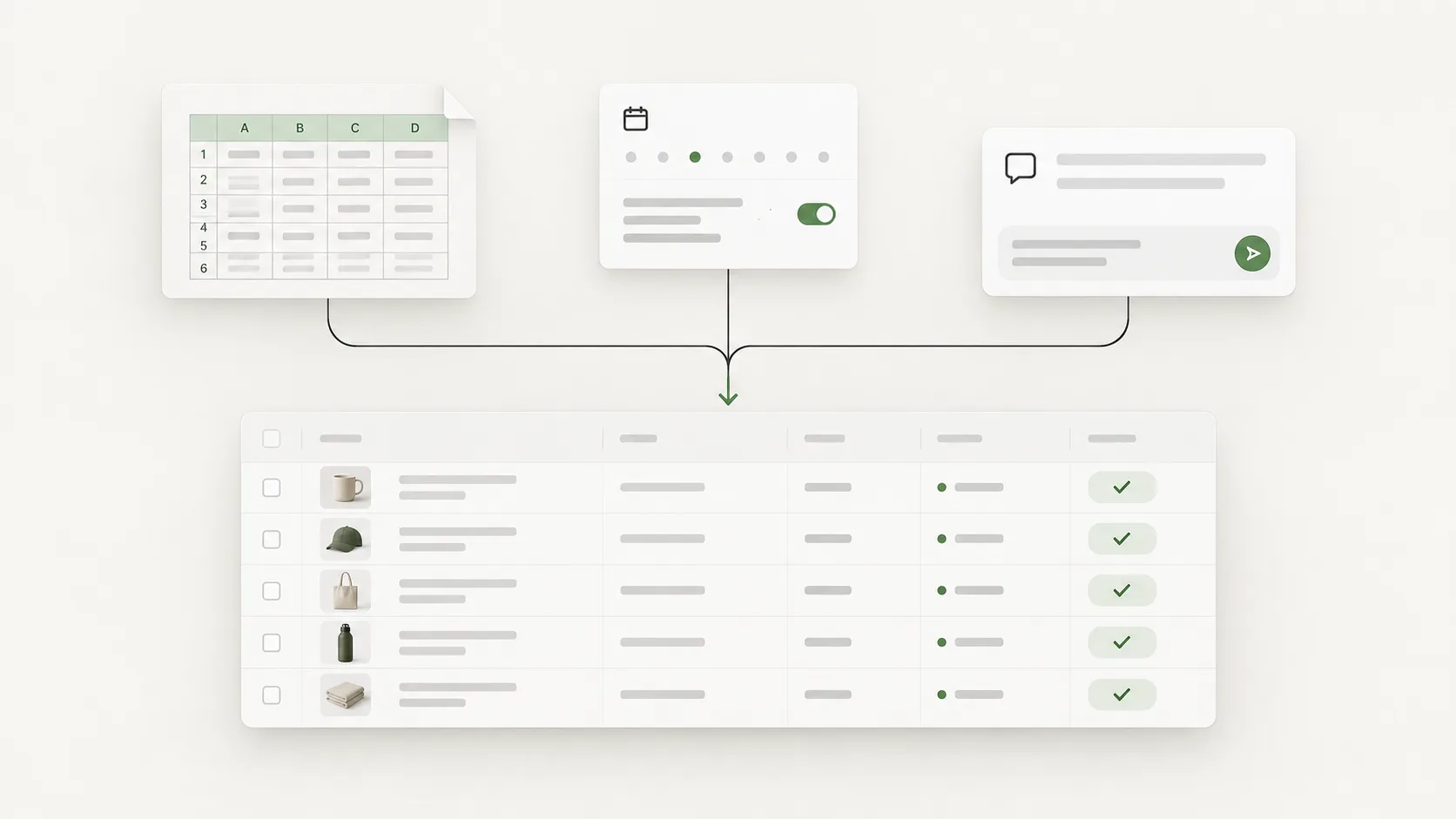
Every tool on this page does the same six things in a different order and with a different amount of it visible. Naming the six makes the rest of the comparison shorter, because most of the differences are about which step a tool shows you and which one it hides.
The Shopify admin does the first two and the fifth. It has no rule beyond a constant, its preview is the filtered list, and its revert is your memory. That is fine for a dozen products and the reason the apps below exist for the rest.
- 01Target set
- Which products or variants change. A filter, a file of handles, a saved segment or a sentence. Every tool on this list has a way to state it; they differ in how early they tell you the count.
- 02Field
- What changes on each row: price, tag, metafield, SEO title, inventory at a location. Some fields are per product, some per variant, some per variant per location. Getting the level wrong is the most common way a bulk edit does something different from what was meant.
- 03Rule
- How the new value is derived. A constant ("set vendor to Kestrel"), a transform ("increase by 10 percent, round to .99"), a template ("title plus the collection name"), or a per-row generation (an alt text written from the title and the image). Files carry values, not rules; task builders carry typed rules; chat carries any rule that can be said.
- 04Preview
- The rows as they will be, before anything is written. A count is not a preview. A preview shows the current value and the new value per row, so a wrong rule is visible as wrong values.
- 05Write
- The change applied to Shopify, row by row or in batches. What matters here is what happens on a failure partway: does the tool stop, skip and report, or leave a half-applied job without saying so.
- 06Revert
- Putting the previous values back. Requires that the previous values were saved at write time. A re-import of an old export is a revert with a gap: anything that changed between the export and the revert is lost.
How to choose, by the job at hand
The honest framing is by job, not by tool. A team that already runs supplier feeds in Excel will be slower in a chat tool. A team that takes ad-hoc requests in Slack will be slower configuring tasks in a builder. The list below is a starting map.
| If the job is | Start with | Why |
|---|---|---|
| Day-to-day catalog changes that start as a request in chat or a meeting | ApiMate | The instruction becomes a proposed Shopify write, with approval before apply and per-command undo. |
| Migrate a catalog between platforms (WooCommerce, Magento, BigCommerce, etc.) | Matrixify | Strongest migration coverage and a 20 GB file ceiling that the others do not reach. |
| Run the same structured bulk edit on a weekly or monthly cadence | Ablestar | Task workflows, saved presets, and one-click undo built around scheduled edits.Alternative: QuickEdit if you want the lowest paid tier and narrower scope. |
| Large one-time batch edits across thousands of products on a budget | Hextom | 50,000 products per task on the top tier and the lowest paid entry on this list at $9.99/mo. |
| Bulk metafield edits across products and variants | ApiMate or Ablestar | ApiMate handles variant metafields from chat with approval. Ablestar covers metafields inside its task workflow. |
| Bulk price campaigns with a clear rollback plan | ApiMate or Ablestar | Both offer an undo flow inside the same tool. ApiMate through chat command history, Ablestar through task history. |
Seven jobs, four ways
Abstract fit is less useful than a job you recognise. These seven come up in support threads for every tool on the list. The columns are the four ways a merchant can do them: a sentence (ApiMate), the admin, a file tool (Matrixify), or a task builder (Ablestar, Hextom, QuickEdit).
| Job | ApiMate (chat) | Admin | File | Task builder |
|---|---|---|---|---|
| Raise every price in one collection by 10 percent, rounded to .99 | One sentence. Preview shows old and new price per variant. | Bulk editor: no percent rule. Export and formula. | Export, formula, re-import. Ten minutes plus checking. | Filter by collection, price edit "increase 10 percent, round .99". Preview, apply. |
| Write alt text for every image that has none | Per-image text from the title and the picture, previewed per row. | Per image, per product. Not a bulk job. | Column exists, but the values have to come from somewhere. | Template from title works; per-image wording does not. |
| Remove the "Ships From" option from imported products | Previewed by variant: which stay, which go, per product. | Per product, options screen. | Deleting an option column collides on re-import. | Not an option-level edit in most builders. |
| Load weights and dimensions from a supplier sheet into metafields | Works from an uploaded sheet, but the file tool is faster here. | Metafields are one product at a time. | The right tool. Values exist; map columns and import. | Import step in Ablestar; otherwise per-field. |
| Publish every active product to the Google & YouTube channel | One sentence, one preview, one approval. | Bulk editor can do it, in pages of fifty. | Published-scope column exists. | Channel publish is a field in most builders. |
| Archive everything from last season with zero stock | Sentence names both conditions. Preview shows the list. | Filter by tag; stock filter is per location. | Export, filter on two columns, re-import status. | Filter on tag AND inventory, set status. Clean. |
| Move a 6,000-product catalog from WooCommerce | No. A migration is a file job. | No. | Matrixify, and nothing else on this list. | No. |
Two rows say "no" for three columns. That is the point: a migration is a file job and nothing else, and per-image alt text is a generation job and nothing else.
How this comparison was done
Five tools are included because they cover the main workflow spread merchants compare: file-driven, task-driven, scheduled, high-volume, and chat-driven. Each tool was checked against three sources:
- Shopify App Store listing for current pricing, plan names, and review counts.
- Vendor site or app documentation for feature scope and use cases.
- Where we could test, the actual flow inside Shopify on a test store.
Ratings and pricing were captured on May 23, 2026. Prices change. If a number below disagrees with the App Store, the App Store is the source of truth. ApiMate is our product and we say so up front. The shortlist would still include four tools we do not own.
What to test before installing
Do not choose a bulk editor only from the App Store listing. Pick one real job from your store, run it as a small test, and check whether the tool makes the risky parts visible before it writes.
| Check | Good signal | Warning sign |
|---|---|---|
| Preview quality | The tool shows exact products, variants, current values, and new values before the write. | The tool only shows a summary count or asks you to trust the filter. |
| Rollback shape | The prior values are captured at write time, and the revert path is visible in history. | Undo depends on finding and rebuilding an old export file. |
| Targeting model | The tool can explain why each row is in scope: filter, file row, saved task, or instruction. | The target set is hard to inspect before apply. |
| Repeat pattern | Recurring work can be saved or scheduled. One-off work can be reviewed without setup. | Every change requires the same manual configuration. |
| Data owner | The workflow matches the owner: merchant, spreadsheet, supplier feed, or engineering. | The merchant has to maintain a file or script they do not understand. |
A good test job is small enough to undo, but real enough to show targeting, preview, and recovery behavior.
Feature matrix
The matrix below uses the field shapes that most teams ask about before they install. Anything plan-dependent is noted in the cell.
| Feature | ApiMate | Matrixify | Ablestar | Hextom | QuickEdit |
|---|---|---|---|---|---|
| Starting point | Chat instruction | Spreadsheet or CSV | Filter and field task | Filter and field task | Filter and field task |
| Free plan | Yes, AI credits | Yes | Yes, 10 products | Yes, 10 per task | Yes, 10/mo, 50 items |
| Lowest paid tier | See pricing | $20/mo | $30/mo | $9.99/mo | $7/mo |
| Undo | Per command and per changeset | Re-import prior export | One-click, 60–180 days | Reversion, 30–180 days | Undo / revert |
| Scheduled / recurring | Not the lead use case | Yes, with FTP/SFTP | Yes, on paid tiers | Yes | Yes (Advanced and up) |
| Metafields | Yes, product and variant | Yes | Yes | Yes | Yes |
| Platform migration | Not the lead use case | Category leader | Imports via CSV/Matrixify | CSV import / export | Not a focus |
| Max products per task / job | No per-product cap | 20 GB import ceiling | Unlimited on paid | 50,000 on Advanced | Unlimited on Professional |
| App Store rating | See App Store | 4.9 (1,205) | 4.9 (797) | 4.9 (1,063) | 4.9 (91) |
Prices and ratings are vendor-published values from the Shopify App Store as of May 23, 2026.
The five tools, in detail
Each section below covers what the tool is, how the workflow shapes up, current pricing, what it does well, where it is weaker, and the kind of merchant who should pick it.
ApiMate
By ApiMate (our product). Best for: Chat-driven day-to-day operations with approval before every write.
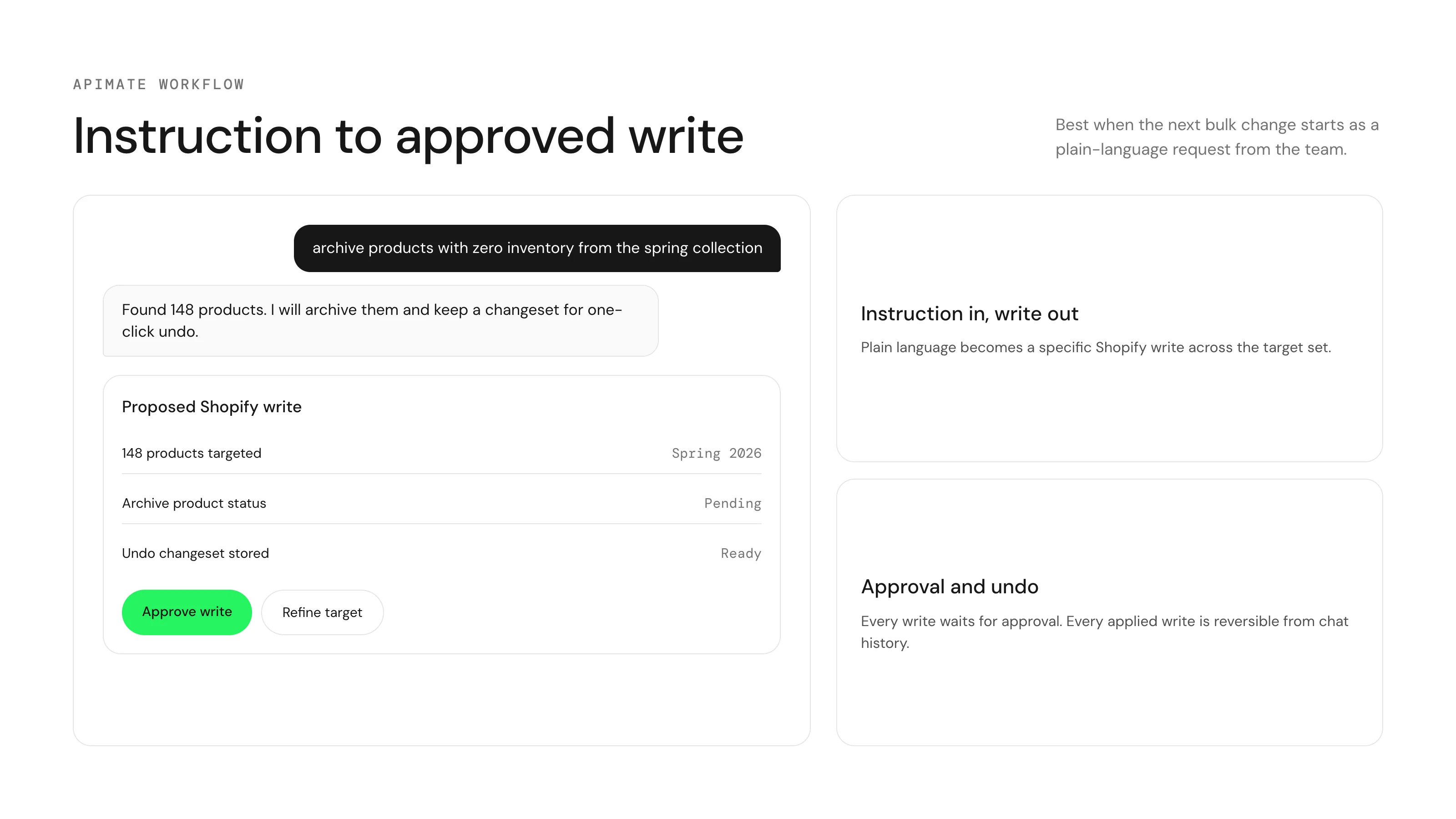
ApiMate is the only chat-led option in this shortlist. The merchant describes the change in plain language, ApiMate prepares the exact Shopify write across the target set, and nothing applies until the merchant approves. Every write is logged and supported updates can be reverted from the chat command history.
How it works
The instruction is the spec. A sentence like "archive all products without inventory from the 2024 spring collection" becomes a proposed Shopify write that lists the exact products and variants that will change. The merchant approves, declines, or asks for a refined version.
Products, variants, metafields, prices, inventory, and orders all live in the same chat surface. Pricing is built around AI credits rather than per-product caps, so a free plan exists for testing and paid plans add larger jobs and longer history.
The preview is a table with one row per product or variant that will change: current value, new value, and the reason it is in scope. The scope line above it states the count. That count is the first thing to read, for the same reason the filter count is the first thing to read in Ablestar: a rule that matched 1,200 products instead of 40 is caught here or not at all.
Reads need no approval, so audits are free of the approval ceremony: "which products have no alt text on any image" is a report, and the fix is a second instruction with its own preview. Writes that cannot be undone (deleting a variant, creating a product) are labelled as such in the preview rather than hidden behind a generic undo promise.
Where it wins
- Instruction-to-write flow removes the task-configuration step for ad-hoc edits
- Approval gate runs before every write, not as an opt-in preview
- Per-command undo from chat history, no reverse import file needed
- Single surface for products, metafields, prices, inventory, and orders
Where it is weaker
- Not built for platform migrations or 50k+ row CSV imports (use Matrixify)
- Recurring scheduled tasks are not the lead use case (use Ablestar or QuickEdit)
- Smaller App Store footprint than the older tools in this list
Pick ApiMate if
- The next ten bulk changes will start as requests in Slack, meetings, or chat
- Reviewable writes and per-command undo matter more than recurring task schedules
- You want one chat surface for products, metafields, prices, inventory, and orders
Matrixify
By ITissible. Best for: Migrations and spreadsheet-driven bulk imports.
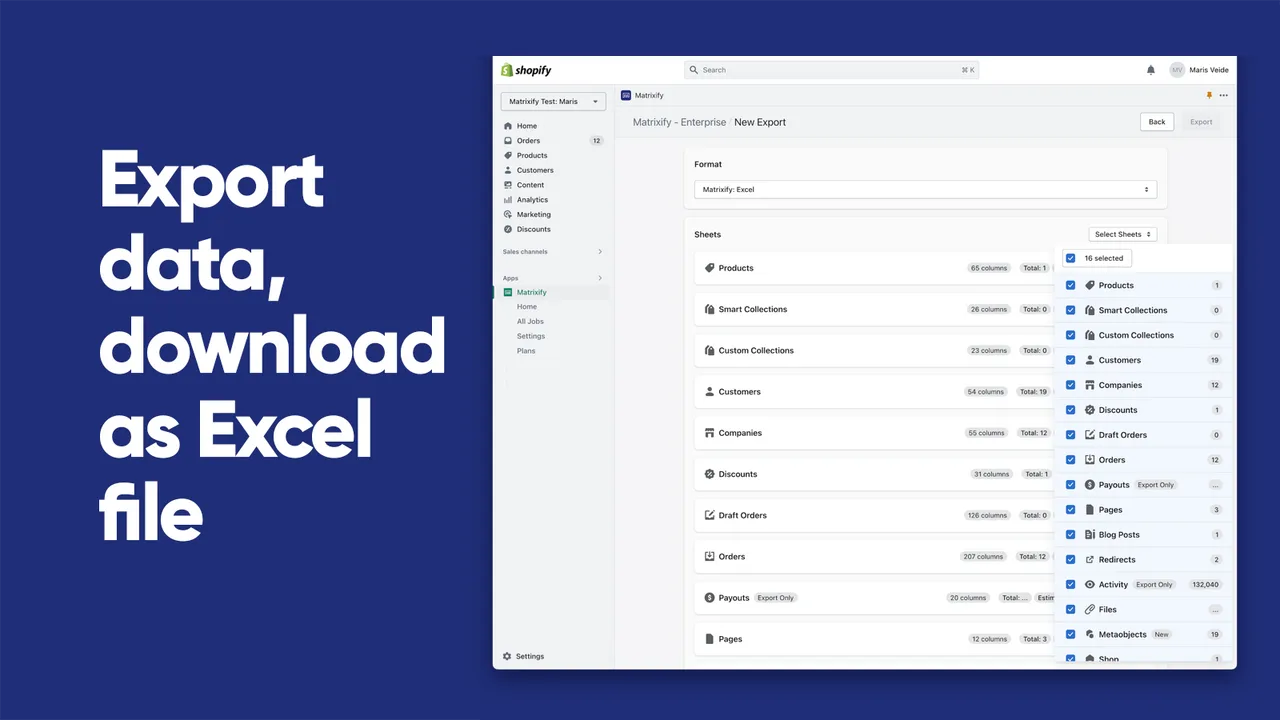
Matrixify is the spreadsheet power tool for Shopify. The flow is file-first: prepare an Excel, Google Sheets, or CSV file, map columns, then run import or export. Handles files up to 20 GB and covers products, variants, metafields, orders, customers, collections, pages, blog posts, and metaobjects.
How it works
Export a slice of the store as a spreadsheet, edit it in Excel or Google Sheets, then re-import. The same flow runs migrations from WooCommerce, BigCommerce, Magento, and other platforms into Shopify.
Jobs can be scheduled and auto-repeated. FTP and SFTP are supported for supplier feeds. Rollback works by re-importing a prior export rather than a one-click undo button.
The export is the part people underrate. Matrixify writes one sheet per resource with every column Shopify exposes, including metafields and variant-level inventory per location, and the column names match the import format. The usual pattern is export, filter in the spreadsheet, delete the rows you are not touching, change the column you are, re-import with "update only". That last option is the safety net: it refuses to create anything.
Where it costs time is the mapping. A supplier sheet with "Colour" and "Sz" columns does not import until someone renames them, and a price column with a currency symbol in it fails per row. Matrixify reports those rows in an import log rather than stopping, which is the right behaviour for a 40,000-row file and an annoying one for a 40-row file.
Where it wins
- 20 GB import ceiling, well above the threshold where most apps fall over
- Broadest migration coverage in the Shopify ecosystem (WooCommerce, Magento, BigCommerce, Lightspeed)
- Schedule and auto-repeat for supplier feeds and recurring exports
- Built for Shopify badge plus 1,205 reviews at 4.9 average on the App Store
Where it is weaker
- File preparation is the price of admission: column mapping has to be exact
- Rollback is a re-import of a prior export, not a one-click undo
- Daily ad-hoc changes feel heavy if you do not already live in spreadsheets
Pick Matrixify if
- You are migrating a catalog between platforms or merging two Shopify stores
- The source of truth already lives in Excel, Google Sheets, or a supplier CSV
- You run scheduled bulk imports or exports on a cadence
Ablestar Bulk Product Editor
By Ablestar. Best for: Structured task workflows with preview and one-click undo.
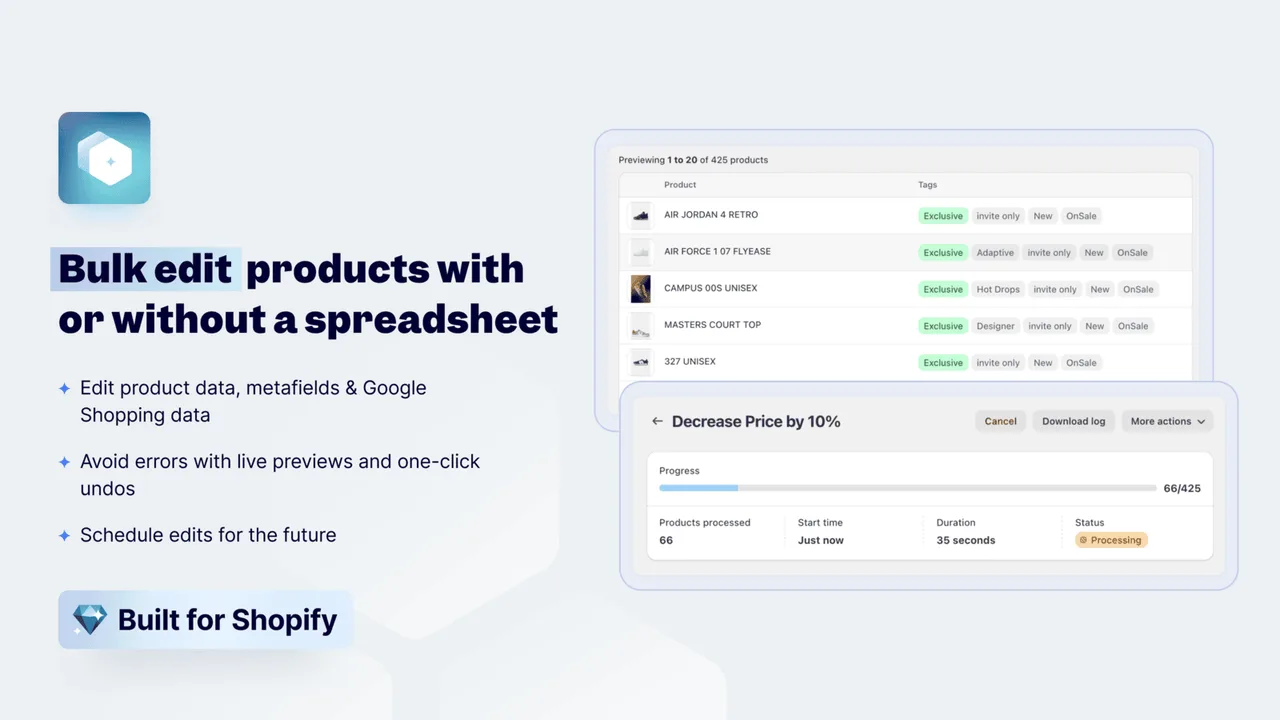
Ablestar is a task-centric bulk editor. The merchant picks a field, picks a filter, previews the proposed change, then applies. It also covers spreadsheet imports in CSV, Matrixify, and Excelify formats. Carries the Built for Shopify badge, which is meaningful in the App Store.
How it works
Edits run as configured tasks: filter the product set, set the new values, run the preview, then approve. The preview shows the exact target rows before the apply step writes anything to the store.
One-click undo applies to recent edits within the history window: 60 days on Basic, 90 on Advanced, 180 on Professional. Inventory sync jobs from external sources and recurring scheduled edits are on the paid tiers.
The filter builder is the heart of it. Conditions combine with AND and OR across tags, vendor, type, collection, price, inventory and metafield values, and the product count updates as you add conditions. That count is worth watching: it is the one number that tells you whether the filter means what you think before you look at the preview.
Edits are typed per field. A price edit offers "set to", "increase by percent", "decrease by amount", "round to .99". A text edit offers find and replace, prepend, append. A metafield edit knows the metafield type. The typing prevents the class of mistake where a percent ends up written as a literal value, which is the mistake CSV imports make silently.
Where it wins
- One-click undo is a first-class control, not a workaround
- Built for Shopify badge meets the App Store performance, design, and integration bar
- Recurring edits and inventory sync are part of the product, not bolted on
- Strong on metafield editing, including across variants
Where it is weaker
- Free plan caps at 10 products, which is more of a trial than a tier
- The starting paid plan at $30/mo is the highest entry point in this list
- Workflow still starts at fields and filters, not at the instruction
Pick Ablestar Bulk Product Editor if
- You plan bulk edits as recurring tasks and want a polished UI for it
- Reversible single-action undo matters more than absolute lowest price
- You need recurring edits, scheduled jobs, or external inventory sync without writing scripts
Hextom: Bulk Product Edit
By Hextom. Best for: High-volume classic batch editing on a budget.
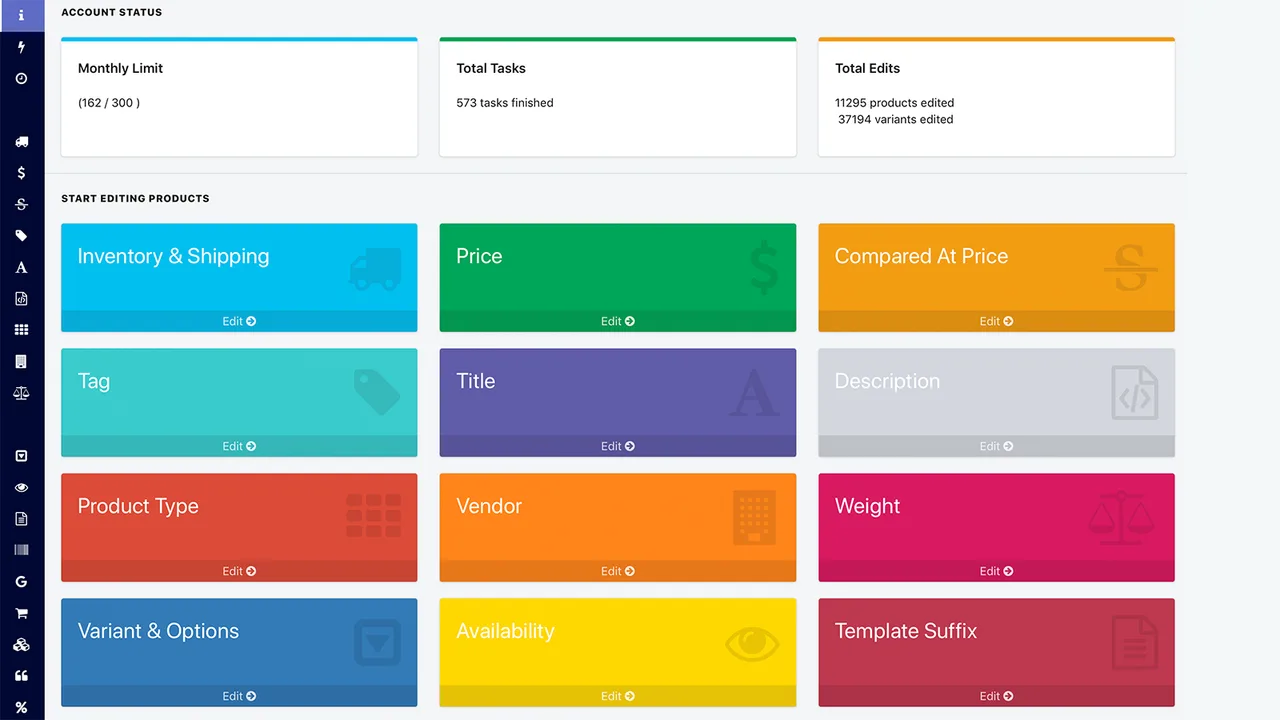
Hextom is one of the oldest names in Shopify bulk editing. The product covers products, variants, orders, collections, images, prices, SKUs, tags, descriptions, inventory, and metafields. The pitch is broad coverage at a low price.
How it works
The flow is the classic batch utility shape: set up a task with filters and target values, optionally schedule it, then run. Per-task product caps step up by tier: 500 on Basic, 5,000 on Professional, 50,000 on Advanced.
CSV import and export, scheduled tasks, change reversion within a 30 to 180 day backup window, and metafield editing are all included. The Advanced plan is the only tier that handles very large product sets in a single task.
The per-task cap is the number to check against your catalog before paying. A store with 3,000 products on the Basic tier runs six tasks to cover the catalog, each with the same filter and an offset, and each with its own reversion entry. It works. It is also the kind of thing you forget halfway through, which is why the Professional tier is the practical floor for stores in the low thousands.
Hextom also covers orders, which the pure product editors do not: bulk tagging orders, adding notes, changing fulfilment status. If the same team does product ops and order ops, one app with one backup window is simpler than two.
Where it wins
- Cheapest paid entry on this shortlist at $9.99/mo
- 50,000 products per task on the top plan, useful for large catalog work
- 1,063 reviews at 4.9 average, with longevity that signals merchant trust
- Order and collection coverage in addition to products
Where it is weaker
- UI is functional rather than refined
- Tasks are configured per change, with no instruction-led shortcut
- Backup window is plan-dependent, which can surprise teams on the free tier
Pick Hextom: Bulk Product Edit if
- You run repeating large-volume batch edits and want the lowest paid tier
- Your team is comfortable with task builders and CSV templates
- You want one app that touches products, variants, orders, and collections
QuickEdit: Bulk Product Edit
By QuickBulkEdit. Best for: Recurring scheduled edits on a cadence.
QuickEdit is a focused bulk editor with a clear recurring-task story. Smaller install base than Hextom or Ablestar but the lowest entry price on this list.
How it works
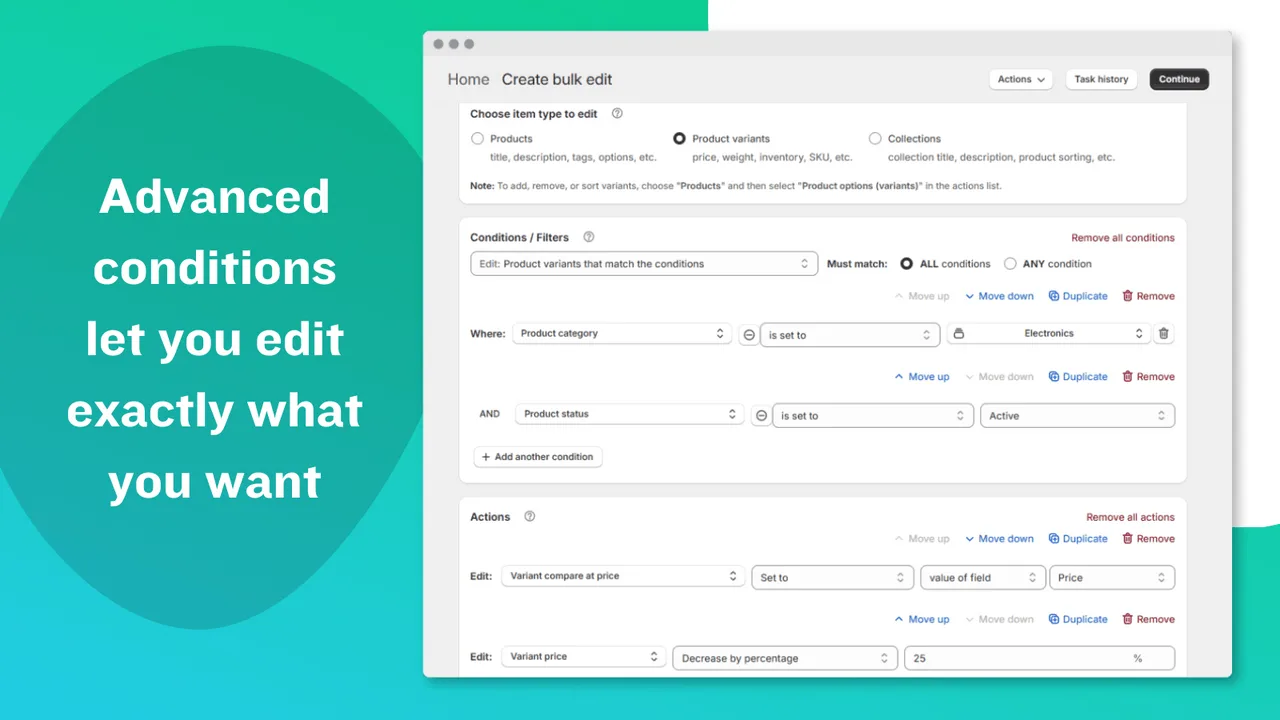
Tasks are saved, can be re-run, and (from the Advanced tier) can run on a schedule. The Professional tier adds recurring tasks. CSV preview before apply is in the product, as is undo and revert.
The product is narrower in scope than Hextom or Ablestar, focused on bulk edits to products, variants, and collections rather than the full operational surface.
A saved task is a filter plus an action plus, optionally, a schedule. "Every Friday at 18:00, set compare-at to price plus 20 percent on everything tagged weekend-deal; every Monday at 06:00, clear it" is two saved tasks. That is the whole product, and for a store whose promotions run on a calendar it is the right whole product.
The narrower surface has a cost when the job drifts. A task cannot read a value from one field and write a rule based on it into another, and there is no metafield-to-metafield copy. When the promotion logic gets that specific, the job moves to Ablestar or to a sentence.
Where it wins
- Cheapest paid tier at $7/mo, with annual pricing options
- Saved tasks and recurring schedules are the lead feature, not an extra
- Undo and CSV preview included on all paid tiers
Where it is weaker
- Smallest install base on this list (91 reviews), so less battle-tested
- Narrower scope: no orders, no full migration story
- Scheduling starts at Advanced, recurring at Professional
Pick QuickEdit: Bulk Product Edit if
- The same bulk edit runs on a known cadence (weekly, monthly, end-of-season)
- You want the lowest paid tier with saved tasks
- You do not need orders, customers, or platform migration in the same tool
Pricing, read by catalog size
The tier tables on the App Store answer "how much per month". The question that decides the bill is "what does the tier cap, and does my catalog hit the cap". Five different answers.
ApiMate
Free plan plus paid plans by usageSmall store: The free plan covers audits and small jobs on any catalog size; the estimate is shown before each run.
Large catalog: Paid plans add larger jobs and longer history. There is no per-product cap, so a large catalog changes the estimate, not the eligibility.
You pay for what runs, not for a ceiling. A month with no jobs costs nothing on the free plan.
Matrixify
Monthly tier by file size and featuresSmall store: Free tier covers a small store's occasional export and import.
Large catalog: The Big and Enterprise tiers exist for files past the Basic ceiling. Migrations usually need one month of a high tier, then a downgrade.
You pay for capacity, not usage. A quiet month costs the same as a busy one.
Ablestar
Monthly tier by product count and featuresSmall store: The 10-product free tier is a trial. Real use starts at Basic.
Large catalog: Unlimited products on paid tiers; the tiers differ by undo window, sync and scheduling.
Highest entry price on this list. What you get for it is the typed edit builder and the longest undo window.
Hextom
Monthly tier by products per taskSmall store: Basic covers a store under 500 products in one task.
Large catalog: Advanced for single tasks past 5,000. Below that, split the job or move up a tier.
The cap is per task, not per month. A large store on a low tier runs more tasks, not fewer edits.
QuickEdit
Monthly tier by edits and items per taskSmall store: Free tier is usable for a small store with a few edits a month.
Large catalog: Professional removes the item cap and adds recurring tasks.
Cheapest paid entry. The scope is narrower, which is the trade.
Where bulk edits go wrong
Five failures account for most of the "how do I undo" threads. None of them is a tool bug. All of them are a step from the anatomy above that the tool let you skip, or that you skipped anyway.
01The filter matched more than you meant
"Everything tagged sale" also matched "sale-2024" in a tool that does prefix matching, or matched drafts you forgot were tagged. The write went to 1,200 products instead of 40.
Guard: Read the count before the preview and the preview before the apply. A tool that shows neither is not a bulk editor; it is a bulk gamble.
02The level was wrong
A price is per variant. A tag is per product. Inventory is per variant per location. A rule written at the wrong level either fails or applies to more rows than intended.
Guard: The preview should say which level each row is. If every row is a product and you meant variants, stop.
03The file lost a column
A CSV opened in a spreadsheet and saved again dropped leading zeros from SKUs, turned a barcode into scientific notation, or lost the image position column. The import succeeded and the damage showed up a week later.
Guard: Import with "update only" and only the columns you changed. Keep the original export untouched.
04The job half-applied
A rate limit or a bad row stopped the write partway. Some products have the new value, some the old, and the tool's log is the only record of which.
Guard: Prefer tools that report per-row outcomes and can resume or revert the partial set. Do not re-run a job blind; the second run applies the rule twice to the rows that succeeded.
05The undo window closed
The mistake was noticed in the next quarter's review. The backup window on the plan was 30 days.
Guard: Know the window before you need it. For changes you may want to revert months later, export the target set before the job and keep the file.
Picks by specialized workflow
The same five tools cover narrower jobs in different ways. Three workflows come up more than the rest: metafields, prices, and inventory.
Best for bulk metafield editing
Metafields hide below the product surface, so a mistake usually shows up a day later when a filter breaks or a storefront rule returns the wrong set. The right tool depends on whether the source of the change is a spreadsheet (use Matrixify), a recurring task (use Ablestar), or a sentence from someone on the team (use ApiMate).
Bulk edit metafields, weight and dimensionsBest for bulk price updates
Price changes are time-pressed and easy to get wrong. The two safeguards that matter most are an approval step before the write and a credible rollback path. Ablestar gives both through task history. ApiMate gives both through chat command history. Hextom and QuickEdit offer reversion within a backup window. Matrixify reverts by re-importing a prior export.
Bulk update prices and inventory, with undoBest for bulk inventory edits
Inventory mistakes affect storefront visibility immediately, so a calm flow with review before apply matters more than raw speed. Ablestar offers inventory sync from external sources on paid tiers. ApiMate handles inventory inside the same chat surface as products and orders. Matrixify is the right choice when stock data already lives in a supplier feed.
Inventory per location, with undoA short decision flow
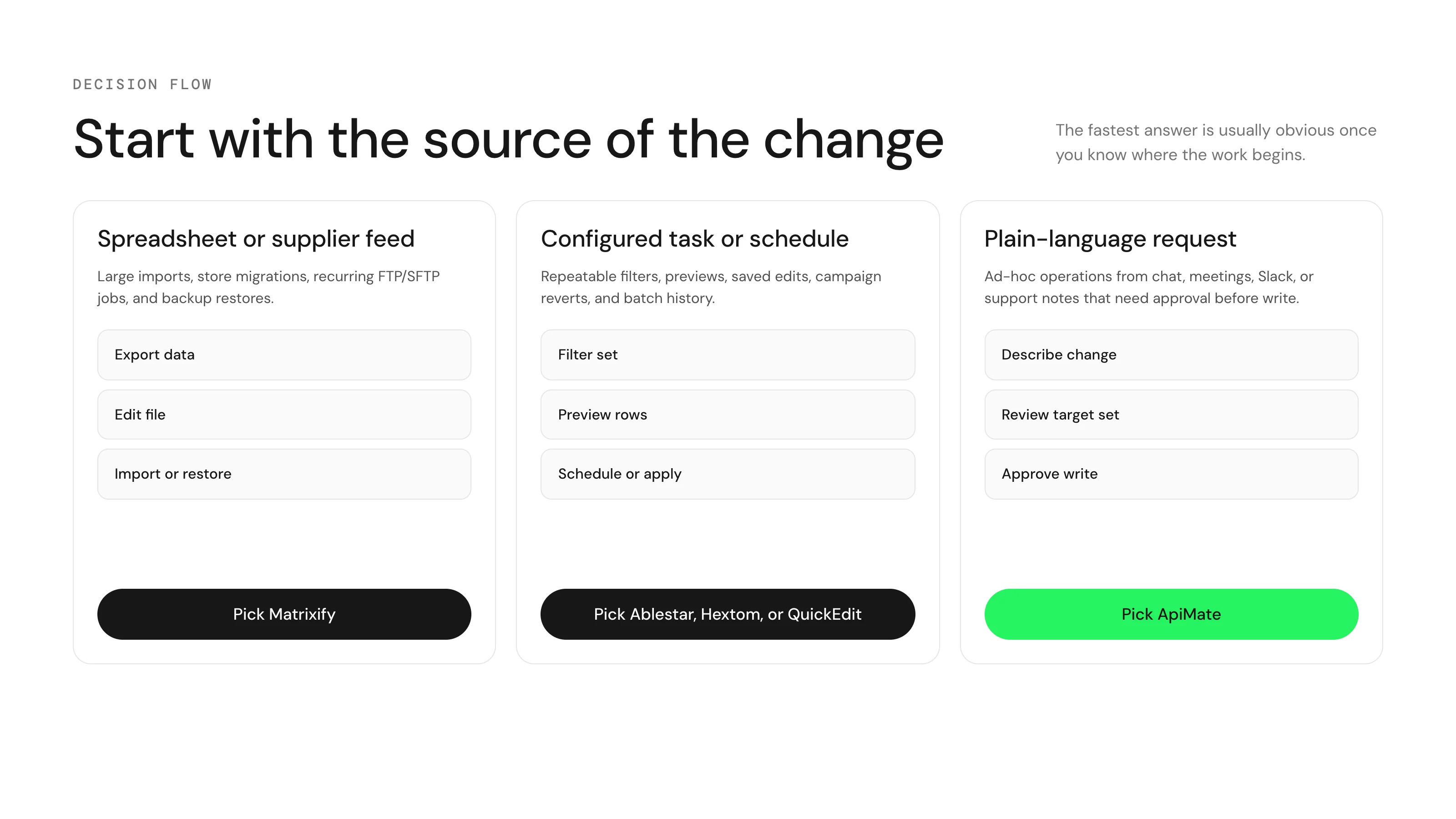
If a quick answer is enough, this is the shortest version.
- The change starts as a sentence in chat, Slack, or a meeting: ApiMate.
- The change starts in a spreadsheet or supplier file: Matrixify.
- The same structured edit repeats on a cadence: Ablestar, or QuickEdit for a lower entry price.
- A large one-time batch on a tight budget: Hextom.
- A migration between platforms or stores: Matrixify, every time.
Most stores past a certain scale end up with two of these for different jobs. The mistake is forcing every workflow through one tool.
Read before choosing a workflow
Bulk editor vs CSV vs API
Use this when the team is deciding between the Shopify admin, a file import, a task app, custom code, or ApiMate.
How to undo a bulk edit in Shopify
Use this when a bulk change has already gone wrong: what the admin, a CSV export and an app backup window each give you.
Audit a catalog before a Google Merchant Center review
Use this when Google has disapproved products and you need to know what to fix first.
Questions
Is there a free Shopify bulk product editor?+
Every app on this shortlist has a free tier. The limits differ. Matrixify lets you try imports and exports with feature caps. Ablestar caps at 10 products. Hextom caps at 10 products per task. QuickEdit allows 10 edits per month with up to 50 items each. ApiMate includes a free monthly AI credit allowance for small bulk jobs. The native Shopify bulk editor in the admin is also free for simple field edits.
Which of these supports undo?+
All of them, in different shapes. Ablestar offers one-click undo on edits within its history window. Hextom supports reversion within a 30 to 180 day backup window depending on plan. QuickEdit includes undo and revert. ApiMate keeps per-command and per-changeset undo in chat history. Matrixify reverts by re-importing a prior export, which works but is slower than a single undo button.
Which one is best for metafields?+
For platform migrations and supplier feeds, Matrixify. For recurring task-based metafield edits, Ablestar. For ad-hoc product and variant metafield edits described in plain language, ApiMate. Variant metafields specifically are where the native Shopify bulk editor is least consistent, which is why merchants tend to add a dedicated tool for that workflow.
Which one is best for scheduled or recurring bulk edits?+
Ablestar and QuickEdit are the most explicit about recurring tasks. Hextom supports scheduling on paid plans. Matrixify supports scheduled jobs with FTP and SFTP, which is the right fit for supplier feeds. ApiMate is not built around recurring scheduled tasks; it is built for the work that begins as an instruction.
What about the native Shopify bulk editor?+
The bulk editor inside the Shopify admin is free, well integrated, and good enough for small field edits across a few hundred products. It gets uncomfortable past that scale, has limited coverage for variant-level metafields, and offers no chat or task-builder layer. Most teams use it for quick fixes and reach for one of the apps in this list once the change crosses two or three minutes of clicking.
Why is ApiMate in this list if it is your product?+
Disclosure: ApiMate is our product, and we included it because it is the only chat-led option in the category. We also flagged where each of the other four wins. If the next bulk change starts in a spreadsheet, Matrixify is the right pick. If it starts as a recurring task, Ablestar or QuickEdit. If it starts as an instruction, ApiMate.
Can I use two of these at once?+
Yes, and most stores past a few thousand products do. The usual pair is a file tool for migrations and supplier feeds plus a task or chat tool for daily changes. The one thing to avoid is two tools with overlapping undo histories editing the same field on the same day; revert one and you may undo the other.
Which one handles variant-level inventory per location?+
Matrixify through inventory columns per location, Ablestar through its inventory edit and sync, Hextom through the inventory task, ApiMate through a sentence that names the location. QuickEdit covers inventory but is less explicit about multiple locations. If you have more than one location, test this job specifically before paying.
Which is safest for a store with one person doing everything?+
The one whose preview you will read. A solo merchant does not have a second pair of eyes, so the tool has to be the second pair. Ablestar and ApiMate put the per-row preview in front of you by default. Matrixify and Hextom show it if you look for it. QuickEdit shows a CSV preview on paid tiers.
How big a catalog is too big for these?+
Matrixify has the highest published ceiling and is the choice past tens of thousands of rows in one job. Hextom caps per task by tier. Ablestar and QuickEdit remove the cap on paid tiers. ApiMate has no per-product cap and shows an estimate before the run; a large catalog changes the estimate, not the eligibility. For any tool, a very large job is better run as several scoped jobs with separate undo entries.
Do any of these write descriptions or alt text for me?+
ApiMate generates per-row text (alt text from the product title, type and vendor, a meta description from the description) and previews it per row. The task builders apply templates: title plus a suffix, find and replace. Matrixify writes what is in the file. If the job needs a different sentence per product, that is the chat tool or a person.
What should I run as a first test?+
A tag. Add a tag to ten products with a filter, check the preview lists exactly ten, apply, then undo. It is the smallest job that exercises targeting, preview, write and revert, and it is harmless if it goes wrong. Then run the real job on a small scope before the full catalog.
Terms used on this page
- Bulk edit: one rule applied to many products or variants in one job, as opposed to editing each in the admin.
- Target set: the products or variants a job will touch. Stated by a filter, a file, a saved task or a sentence.
- Preview: the rows as they will be after the job, shown before the write. A count alone is not a preview.
- Undo window: how long after a job a tool can put the previous values back. Plan-dependent on most task builders.
- Re-import revert: restoring values by importing an older export. Works, but loses anything changed since the export.
- Task builder: an app where the merchant configures a filter and an action in a form, then runs it. Ablestar, Hextom and QuickEdit are task builders.
- Built for Shopify: an App Store badge for apps that meet Shopify's performance and design bar. Meaningful, not decisive.
- Metafield: a custom field on a product or variant, typed (weight, dimension, text, reference). Where most tool-specific differences hide.
Head-to-head comparisons
ApiMate vs Ablestar
Choose Ablestar when the same edit runs every week and you want to save it as a task. Choose ApiMate when each request is different, arrives as a sentence, and needs a preview before it touches the store.
ApiMate vs Hextom
Choose Hextom when you run high-volume classic batch edits on a budget and are fine configuring tasks. Choose ApiMate when the job is a sentence from a person, needs a row preview before it writes, and you do not want to think about per-task caps.
ApiMate vs Matrixify
Choose Matrixify when the values already sit in a file: a migration, a supplier catalog, a scheduled feed. Choose ApiMate when the change is a rule with conditions, a question first, or per-row text, and you want a preview and one approval instead of a re-import.
ApiMate vs QuickEdit
Choose QuickEdit when the same edit repeats on a known cadence and you want the lowest paid tier with saved tasks. Choose ApiMate when each request is different, has conditions, and needs a row preview before it writes.
Try the chat-led option
ApiMate is the only tool on this list that starts from an instruction instead of a task or a file. Free plan available. Every write is reviewed before it applies, and supported changes can be undone from chat history.
Pricing, ratings, and feature scope were verified against the Shopify App Store and each vendor site on May 23, 2026. Numbers change; the App Store listings are the source of truth. ApiMate is our product, disclosed up front.