
ApiMate vs Ablestar
Compared as of 2026-09-14 · Ablestar source
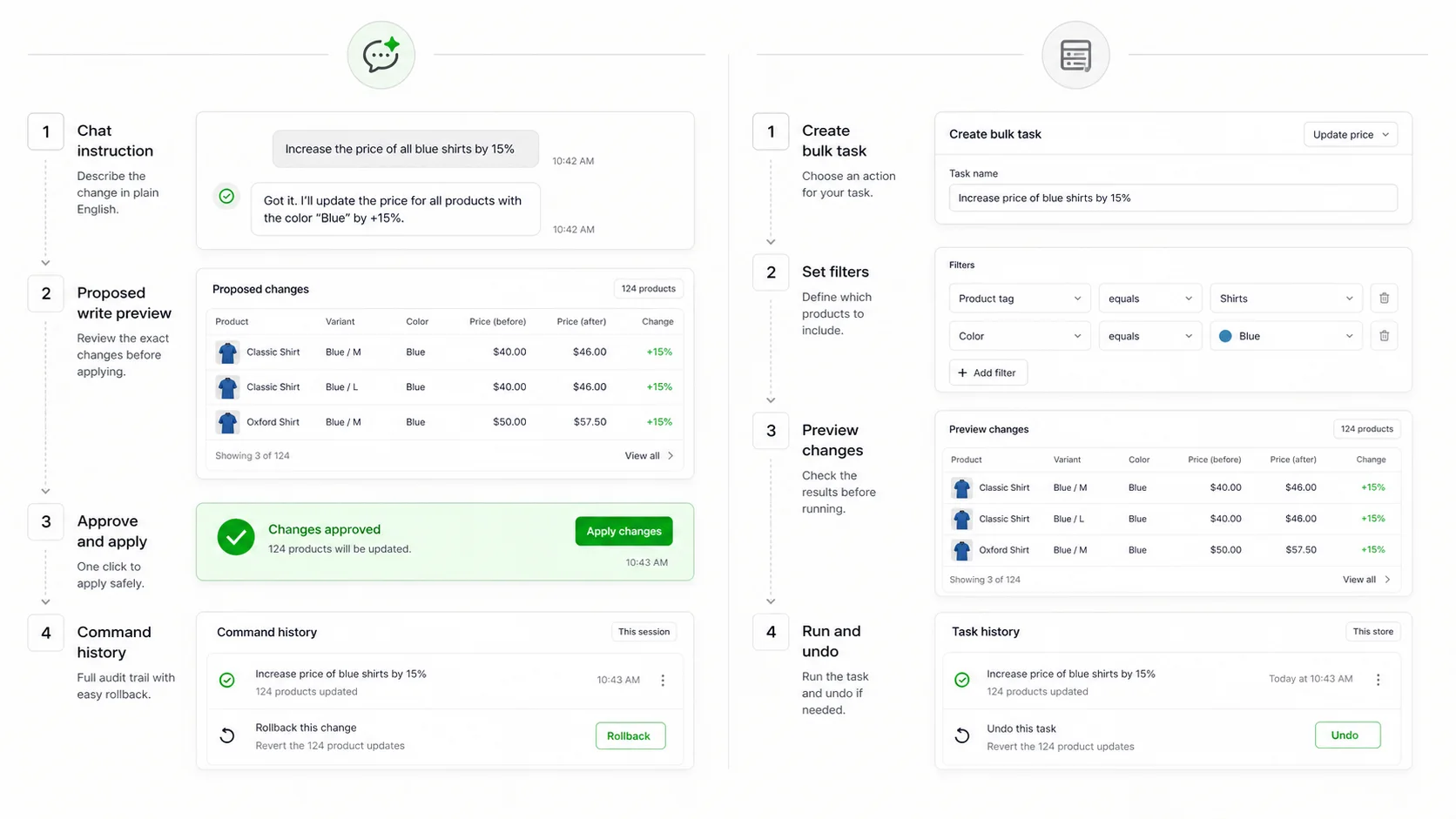
Ablestar is the most polished task builder on the Shopify App Store: pick a filter, pick a field, preview, apply, undo. ApiMate starts one step earlier, at the sentence, and ends at the same place: a preview of every row, one approval, a revert in history. The difference is who translates the request into a task. In Ablestar it is you. In ApiMate it is the tool, and you check its work.
| Feature | ApiMate | Ablestar |
|---|---|---|
| Starting point | A sentence in chat | A filter and a field in a task form |
| Preview | Every row: current value, new value, reason in scope | Every row after the task is configured |
| Approval before write | Required on every write | Preview step, then apply |
| Undo | Per job from history; saved values, no window on the free plan | One-click, 60 days Basic, 90 Advanced, 180 Professional |
| Recurring and scheduled edits | Not the lead use case | Saved tasks, schedules, on paid tiers |
| Metafields | Product and variant, typed, from a sentence or a sheet | Product and variant, typed, in the task editor |
| Generated text (alt text, descriptions) | Per row, previewed | Templates and find-and-replace |
| Reads and audits | Any question about the catalog, no approval needed | Filter counts and exports |
| Free plan | Yes; audits and small jobs on any catalog size | Yes, 10 products per edit |
| Paid entry | See pricing | $30/mo Basic, $60 Advanced, $120 Professional |
| Built for Shopify badge | See App Store | Yes |
| Best fit | Different request every time, from a person | Same task on a schedule, from a form |
What Ablestar is
Ablestar Bulk Product Editor is a task builder. You open it from the Shopify admin, choose what to edit (products, variants, collections, metafields, inventory), build a filter with AND and OR conditions across tags, vendor, type, price, inventory and metafield values, choose the field and the edit type, preview the rows, and apply. The filter count updates as you add conditions, which is the first place a wrong filter shows.
Edits are typed per field. A price edit offers set, increase by percent, decrease by amount, round to .99. A text edit offers find and replace, prepend, append. A metafield edit knows the metafield type, so a dimension metafield does not get a string written into it. The typing prevents the class of mistake CSV imports make silently.
Undo is one click from the task history, within a window that depends on the plan: 60 days on Basic, 90 on Advanced, 180 on Professional. Paid tiers also add scheduled tasks, recurring edits and inventory sync from external sources. The app carries the Built for Shopify badge and, as of the App Store check in May 2026, sits at 4.9 with close to 800 reviews.
What ApiMate is
ApiMate is a chat that reads and writes your Shopify store. You write the change as a sentence: "raise every price in the Winter collection by 10 percent, round to .99, skip anything already on sale". ApiMate reads the catalog, works out the target set and the rule, and shows a preview: one row per variant, current price, new price, and why it is in scope. Nothing is written until you approve.
After approval the write runs, the job is stored in history with the values it replaced, and revert is one instruction. Reads ("which products have no alt text on any image") need no approval and produce a report. Writes always go through the preview.
The pieces are the same as Ablestar's: target set, field, rule, preview, write, revert. The order is different. Ablestar has you build the target set and the rule in a form, then shows the rows. ApiMate has you say the target set and the rule, builds them, and shows the rows. Whether that is better depends on whether translating the request into a form is work you want to do.
The same job, both ways
Take a job both tools handle well: everything from the vendor Cedar & Pine that has been in the store more than 90 days and has stock above 20 gets a 15 percent markdown, rounded to .99, with the compare-at price set to the old price.
In Ablestar: new task, resource Variants, filter vendor equals Cedar & Pine AND product created before a date AND inventory greater than 20. Read the count. Field: price, edit type decrease by percent, 15, round .99. Second field: compare-at price, edit type set to current price. Preview the rows. Apply. Later, undo from history if needed.
In ApiMate: the sentence below. Read the scope line. Read the preview rows. Approve. Later, "revert the Cedar & Pine markdown" if needed.
The number of steps is not the point; both take a few minutes. The point is where the thinking happens. In Ablestar you think in filters and edit types, which is precise and repeatable. In ApiMate you think in the language the request arrived in, and the precision comes from reading the preview.
Instruction
Every Cedar & Pine product created more than 90 days ago with stock above 20: set compare-at to the current price, then reduce the price by 15 percent and round to .99. Skip anything that already has a compare-at price.
| Step | Ablestar | ApiMate |
|---|---|---|
| State the target set | Three filter conditions in a form | Three clauses in a sentence |
| Check the count | Filter count updates live | Scope line above the preview |
| State the rule | Two typed field edits | Two clauses in the same sentence |
| Preview | Row table, current and new | Row table, current, new, reason |
| Apply | Apply button | Approve |
| Revert | Undo in task history, within the plan window | One instruction, from history |
| Run again next month | Saved task, or scheduled | Send the sentence again |
Same job, same safeguards. The difference is the form versus the sentence, and the saved task versus the repeated sentence.
Where Ablestar is the better tool
Ablestar wins when the job repeats. A saved task with a saved filter is a thing the team can name, schedule and hand over. "Run the Friday markdown" means the same thing in March and in November, and the schedule runs it without anyone typing.
- The same edit runs weekly or monthly. A saved and scheduled task is the right shape, and ApiMate does not lead with schedules.
- Inventory sync from an external source on a cadence. That is a paid Ablestar feature and not an ApiMate job.
- The team already thinks in filters. A merchandiser who knows the store's tag taxonomy builds an Ablestar filter faster than they write a sentence.
- A long undo window is the buying reason and the store is on Professional. 180 days is longer than most teams need and longer than most tools offer.
- The store wants a dedicated admin screen for bulk work, with task history as the audit trail, rather than a chat surface.
Where ApiMate is the better tool
ApiMate wins when the job is different every time and starts as a sentence from a person: a Slack message, a line in a meeting, an email from the founder. Turning that into an Ablestar task is translation work, and translation is where the intent gets lost.
- The request has a condition a form does not have a field for. "Skip anything that already has a compare-at price" is one clause in a sentence and an extra filter step, if it exists, in a form.
- The values have to be written per row. Alt text from the image's product, a meta description from the description, a title rewritten to a pattern with exceptions. Ablestar applies templates; ApiMate writes each row and previews it.
- The job is a question first. "Which products have weight missing?" is a read with no approval, and the fix is the next sentence. Ablestar answers it with a filter and an export.
- One surface for products, variants, metafields, inventory and orders. A request that touches two of those is one conversation, not two tasks.
- No per-product cap on the free plan. Ablestar's free tier stops at 10 products per edit, which is a trial. ApiMate's free plan runs audits and small jobs on any catalog size, with the estimate shown before the run.
Preview and undo, compared
Both tools put a row-level preview between the rule and the write, and both keep the values they replaced so a revert is a real revert rather than a re-import. The differences are in the details, and the details are what decide whether you trust the tool with a price change on a Friday evening.
| Question | Ablestar | ApiMate |
|---|---|---|
| Does the preview show every row? | Yes, after the task is configured | Yes, with the reason each row is in scope |
| Is approval required? | Apply is a deliberate click after preview | Every write waits for approval; reads do not |
| What is saved for undo? | Previous values, in task history | Previous values, in job history |
| How long can I undo? | 60, 90 or 180 days by plan | From history; no window on the free plan |
| Partial failure? | Task reports per-row results | Job reports per-row results; revert covers the rows that wrote |
| What cannot be undone? | Deletions, as in any tool | Deleted variants and created products, labelled in the preview |
| Can I undo one job without touching a later one? | Yes, per task | Yes, per job |
Undo windows are the App Store values as of the May 2026 check. Verify on the listing before relying on them.
Pricing, compared
Ablestar is priced by tier: Free, Basic at $30 a month, Advanced at $60, Professional at $120. The tiers differ by undo window, scheduling, sync and support. The free tier caps at 10 products per edit, which makes it a way to see the interface rather than a way to run a store. Basic is the practical floor, and it is the highest entry price among the task builders on the App Store.
ApiMate has a free plan and paid plans by usage. The free plan runs audits and small jobs on any catalog size; the estimate for a job is shown as a range before it runs, and a job cannot spend past the balance. Paid plans add larger jobs and longer history. A month with no jobs costs nothing on the free plan; a month with a lot of catalog work costs what those jobs cost.
The models suit different stores. A store that runs the same three tasks every week pays Ablestar a flat amount and never thinks about it. A store that does a burst of catalog work twice a year, and a question or two in between, pays ApiMate for the bursts. Neither is cheaper in general; one is cheaper for your pattern.
Scale: large catalogs
Ablestar removes the per-edit product cap on paid tiers, so a task can cover the whole catalog. Large tasks take longer to preview and to run, and the preview for tens of thousands of rows is a table nobody reads end to end. The practical answer is the same as everywhere: scope the task, run it in pieces, keep the pieces separate in history.
ApiMate has no per-product cap. A large catalog changes the estimate, not the eligibility, and the estimate is shown before the run. The preview for a large job is paginated, with the scope line first and the rows below; the scope line is the number to read. Long jobs report progress per batch and can be revoked partway, with the rows already written revertable as a set.
Neither tool is the right one for a platform migration or a supplier file with tens of thousands of rows. That job is Matrixify, and both this page and the roundup say so.
Metafields
Both tools edit product and variant metafields with type awareness. Ablestar does it through the task editor: choose the metafield, choose the edit type, preview. It is one of the stronger metafield editors on the App Store, including across variants.
ApiMate does it from a sentence or from an uploaded sheet. "Set the weight metafield to 1.2 kg on every variant with SKU starting HD-" or "load the dimensions from this sheet by SKU" both produce a per-row preview with the typed value and the unit. Missing metafield definitions are proposed before the write, and rows that do not match (a SKU in the sheet that is not in the store) are listed as skipped.
The split: values already in a sheet are a wash between the two, with Matrixify as the third option for very large sheets. Values derived by rule with exceptions, or asked as a question first, favour the sentence.
Running both
A store past a few thousand products often ends up with two tools for different jobs. Ablestar for scheduled maintenance: the Friday markdown, the Monday reset, the inventory sync. ApiMate for the requests that arrive in chat and need a preview before they touch the store. That is cleaner than forcing every job through one product.
The one thing to avoid is both tools editing the same field on the same day with the intent to revert. Revert one job and you may be undoing the other. Keep the split by job type and the histories stay clean.
Clean split
Ablestar owns the tasks that repeat on a schedule. ApiMate owns the requests that arrive as sentences. Neither owns the other's history.
What to test before choosing
Do not choose from the listings. Take the last five bulk edits the team actually ran and run one of them in each tool on a small scope. The pattern in those five usually decides the tool.
- Does the preview show every row with current and new values, or a count? Both should show rows; check that you can read them.
- Change the scope halfway. Is it a filter edit or a rebuild in Ablestar; a second sentence in ApiMate?
- Run the undo on the test job. Time it. Check that the values came back exactly.
- Try a job with an exception clause ("except anything already on sale"). See which tool makes the exception visible.
- Ask a question. "How many products have no vendor?" One tool answers; the other exports.
- Check the free tier against your catalog size before assuming the test represents the real job.
Where each tool stops
Ablestar does not write per-row text. Templates and find-and-replace cover a lot, but an alt text that describes the picture is not a template. It is also a product editor first; orders are not its surface.
ApiMate does not lead with schedules. A sentence that should run every Friday is a sentence you send every Friday, or a job for Ablestar. It also refuses jobs that need a file (a migration, a supplier catalog with thousands of rows and images) and says so.
Neither creates barcodes, brand names or product photos. Those are facts about the product and come from the supplier.
Terms used on this page
- Task: in Ablestar, a saved combination of filter, field and edit type. Can be scheduled on paid tiers.
- Filter count: the number of products or variants matched by a filter, shown live in Ablestar. The first place a wrong filter shows.
- Scope line: in ApiMate, the count and description of the target set above the preview. Same role as the filter count.
- Typed edit: an edit that knows the field type (price, percent, dimension) and refuses a value of the wrong kind.
- Undo window: how long after a task Ablestar can put the previous values back. Plan-dependent.
- Read: an ApiMate instruction that produces a report and writes nothing. Needs no approval.
- Built for Shopify: an App Store badge for apps meeting Shopify's performance and design bar.
Frequently asked questions
Is Ablestar better than ApiMate?+
For a task that repeats on a schedule, yes. For a request that is different each time and arrives as a sentence, no. Both preview every row and both revert from history; the difference is whether you build the task or say it.
Can ApiMate replace Ablestar's scheduled tasks?+
Not as a lead use case. A sentence that should run every Friday is a job for Ablestar's scheduler. ApiMate is for the requests that do not repeat.
Which is better for metafields?+
Both edit typed product and variant metafields with a preview. Values already in a sheet are a wash. Values derived by rule with exceptions, or preceded by a question about which rows are missing, favour ApiMate.
Which has the longer undo?+
Ablestar's window is 60, 90 or 180 days by plan. ApiMate reverts from job history with the saved previous values and does not put a window on the free plan. Verify both on the listings before relying on either.
Which is cheaper?+
Depends on the pattern. Ablestar is a flat monthly tier from $30. ApiMate is a free plan plus usage-based paid plans. A store with steady weekly tasks pays Ablestar less per task. A store with bursts of work and quiet months pays ApiMate less per year.
Can I use both?+
Yes, and it is a common split: Ablestar for the scheduled maintenance, ApiMate for the sentences. Avoid editing the same field with both on the same day if you may want to revert.
Does either handle orders?+
ApiMate reads and writes orders in the same chat as products. Ablestar is a product editor. If the same person does product and order ops, that is a point for one surface.
What should I test first?+
A tag on ten products, then undo. Then the real job on a small scope. Then a job with an exception clause. The third test is where the two tools feel most different.
Related pages
Try ApiMate on a real Shopify catalog
Install from the Shopify App Store. Every write is reviewed before it runs, and any change can be rolled back from the command history.