
A Merchant Center suspension gives you a policy name and a deadline, not a list of products. The audit on this page turns the policy names into eleven checks against your own catalog, runs them without changing anything, and reports totals plus the first 50 flagged rows for each check. Every check links to the job that fixes it. The free plan covers a full pass; an audit is a read, and reads need no approval.
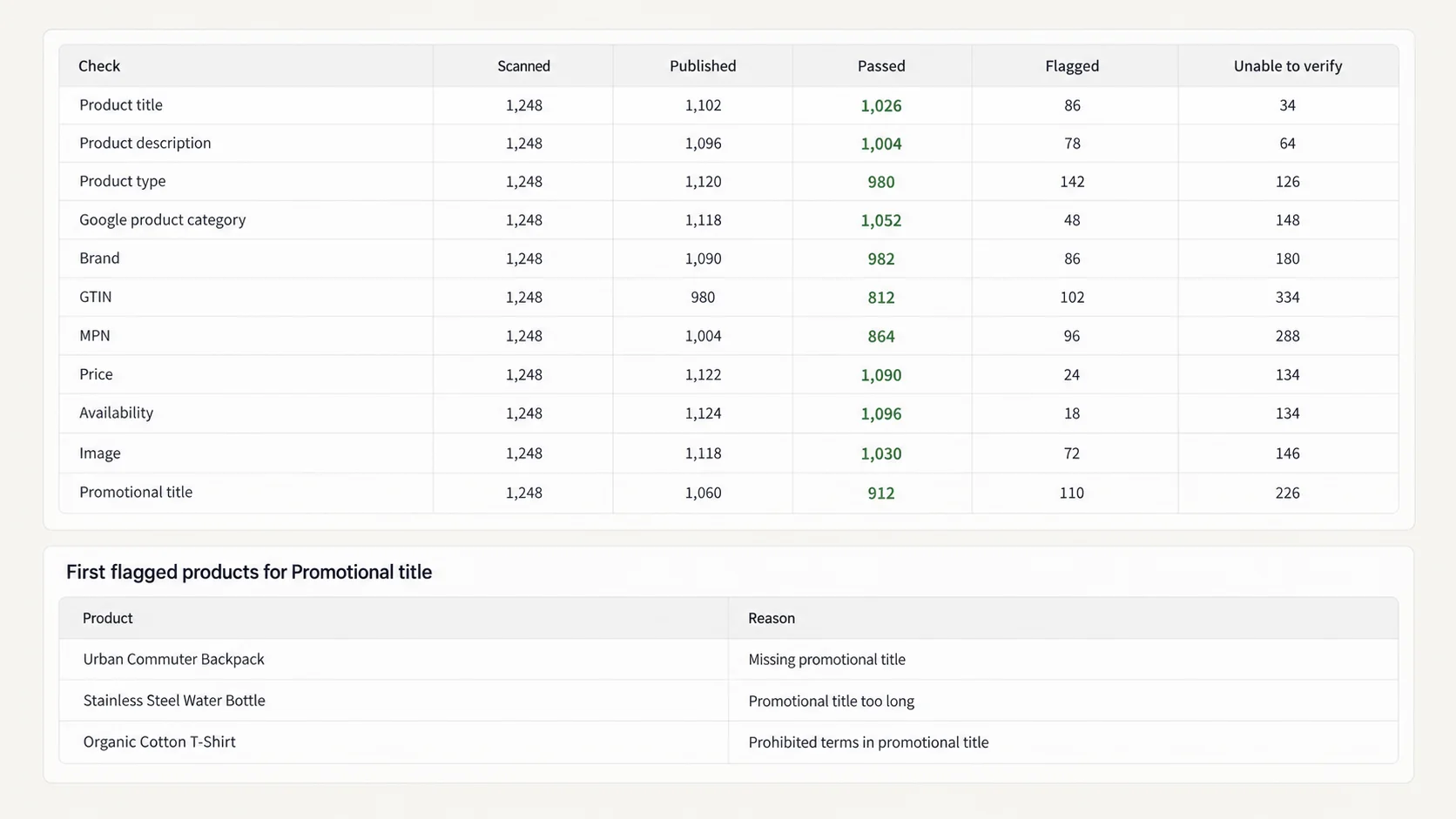
The estimate is shown as a range before the run, because a catalog of four-image products costs more to check than a catalog of one-image products, and a turn cannot spend past the remaining balance. The report is a table people screenshot: scanned, published to the channel, passed, flagged, unable to verify, per check.
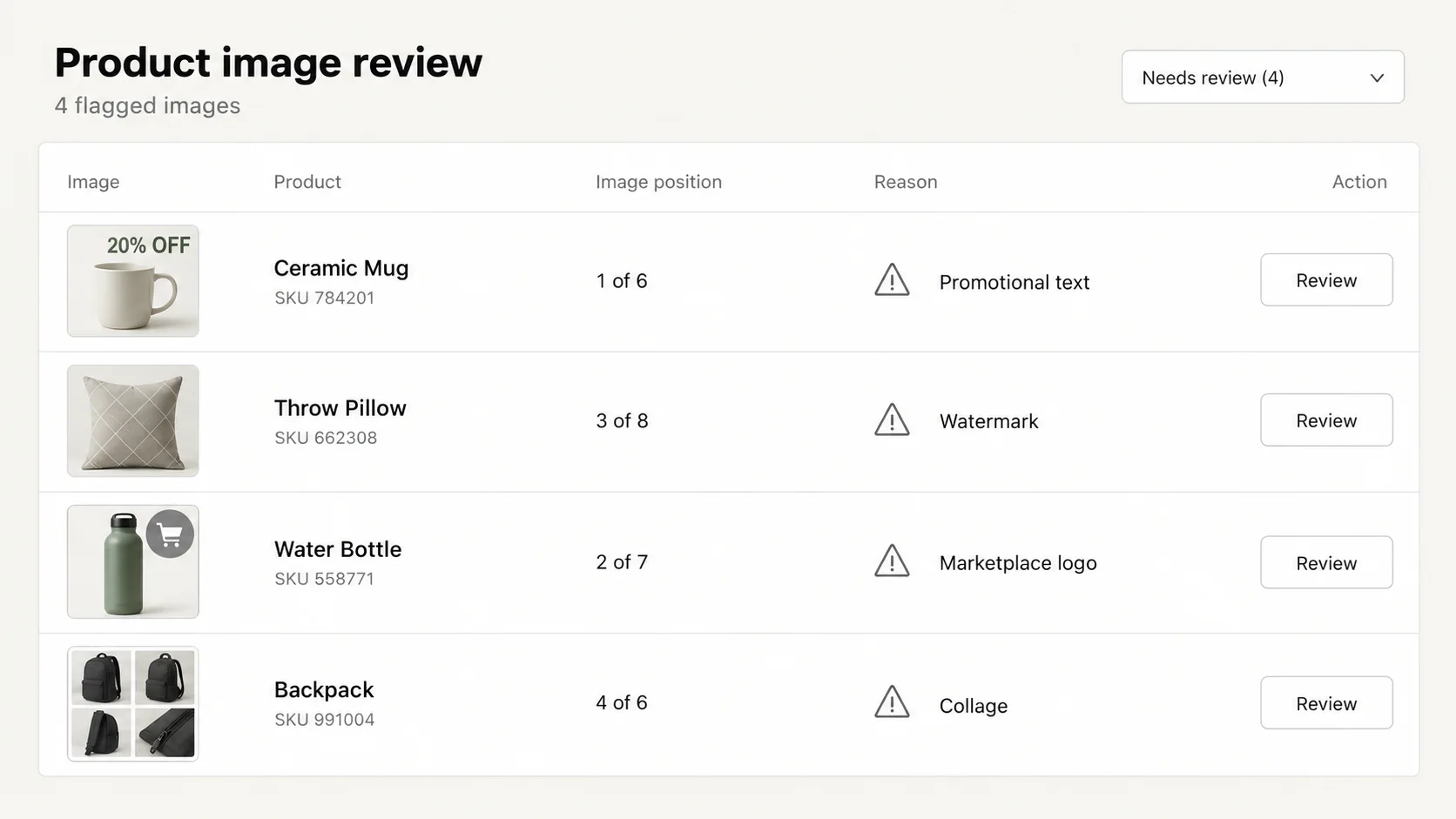
Images are checked by a vision model for the things Google's reviewers look for: promotional text on the picture, watermarks, supplier or marketplace logos, collages. Lettering that is part of the product's own design is exempt. A flag means "look at this", not "this is wrong". A person still opens the flagged ones.
Who runs this job, and why now
The first reader is a merchant whose Merchant Center account was just suspended for "misrepresentation" or whose products were disapproved in a wave. The email names a policy. It does not say which of the six hundred products triggered it, and the appeal form asks what you changed. You need the list before you can change anything.
The second is a merchant about to connect the Google & YouTube channel for the first time, or about to scale spend on Shopping ads, who would rather find the problems than have Google find them. A catalog imported from a supplier has supplier text in the descriptions, promotional words in the titles and watermarked images, and every one of those is a known disapproval reason.
The third is an agency or a freelancer running the same check across several client stores before a campaign. The instruction is the same on every store; the report format is the same; the fixes are scoped per store. This is the job that benefits most from being a sentence rather than a spreadsheet macro.
How this is done without ApiMate, and where each way breaks
Merchant Center itself has a diagnostics page: Products, Needs attention, filter by issue. This is the list of what Google has already rejected. It is accurate and it is late: it tells you nothing about the products Google has not looked at yet, and during a suspension the whole feed is offline, so the per-product list stops updating.
In the Shopify admin, you can filter Products by "Sales channel: Google & YouTube" to see what is published to the channel. There is no filter for "has a barcode", "description mentions a supplier" or "title contains an exclamation mark". Each of those is an export, a spreadsheet, and a formula per column. Image checks are not possible in a spreadsheet at all; someone opens the images.
Feed management apps sit between Shopify and Google and can rewrite fields on the way out, which hides the problem from Google without fixing it in the store. Some flag missing GTINs and brands. None of them read the picture. The audit here reads the store, so what it finds is what the customer and the reviewer see, and the fixes land in the store, not in a feed layer.
The instruction, as written
A skincare merchant wrote the template after a disapproval wave: audit all active products on the Google channel for image compliance, do not make changes yet, go through every product, report totals and the first 50 flagged. That prompt has the four things an audit instruction needs: the scope, that nothing changes, that every product is read rather than a sample, and what the output looks like.
Say "do not make changes" even though a read cannot write. It tells the tool to plan a report, not a fix, and it keeps the audit and the fixes as separate steps with separate approvals. The fixes come later, one check at a time.
Instruction
Audit all active products for Google Merchant Center. Do not make changes. Go through every product. For each check report the total scanned, passed, flagged and unable to verify, then the first 50 flagged rows with product title and the reason.
- Scope: active products. Drafts and archived products are not in the feed.
- Mode: read only. The output is a report.
- Coverage: every product, not the first page. The scope line confirms the count.
- Format: totals per check, then the first 50 flagged rows with the reason.
The eleven checks
Each row is a Merchant Center reason, what in the Shopify data predicts it, and the job that fixes it. Run them as one instruction or one at a time; the report is the same shape either way.
| Check | Merchant Center reason | Fix |
|---|---|---|
| Active products not published to the Google & YouTube channel | Product missing from feed | Publish to the channel |
| Variants with no barcode | Missing GTIN, limited performance | Supplier data; the tool does not invent identifiers |
| Missing vendor or product type | Missing brand | Fill vendor by rule |
| Titles with "free shipping", "sale", "%", "!!!", ALL CAPS | Promotional text in title | Rewrite by rule with preview |
| Descriptions mentioning AliExpress, Alibaba, dropship, a supplier name | Misrepresentation | Remove the text, keep the rest |
| Compare-at price lower than price; price 0 | Price mismatch, invalid price | Price job |
| Active products with zero stock at every location | Availability mismatch | Stock or status job |
| Missing weight | Shipping errors | Weight and dimensions job |
| Products with no image; images with promo text, watermark, logo, collage | Missing or non-compliant image | Needs the merchant; the report says which |
| Duplicate titles across products | Duplicate products | Report only |
| Descriptions under 40 words | Thin content | Description job |
The check on the Google channel is the one merchants miss. In one audit the report said the channel was not installed at all, instead of showing zero.
What the report showed
Totals first: scanned, published to the channel, passed, flagged, unable to verify. "Unable to verify" is honest; it means the data was not there to check, for example a product with no images at all cannot fail the image check, and it is counted separately so the passed number is not inflated.
Then the first 50 rows per check, with the product title and the specific reason: "title contains 'FREE SHIPPING'", "description mentions AliExpress in paragraph 2", "image 3 has text overlay". Fifty is enough to see whether the flags are real before you ask for the full list, and the full list is one more instruction away.
| Column | What it is | What to check |
|---|---|---|
| Scanned | Products read for this check | Equals the active count; if lower, the scope was not "every product" |
| Published | Products on the Google & YouTube channel | If much lower than scanned, start here; nothing else matters until products are in the feed |
| Passed | Products with no flag for this check | A high pass rate on titles with a low one on descriptions points at the import |
| Flagged | Products with at least one flag | Read the first 50 reasons; if they look wrong, the rule needs tightening before the fix |
| Unable to verify | Products without the data to check | A product with no images, a variant with tracking off |
| Reason | The specific trigger on the row | This is what goes into the fix instruction |
The report per check. The reason column is what the fix job scopes on.
Titles and descriptions
Promotional text in titles and supplier names in descriptions are the two fastest fixes and the two most common suspension reasons. "FREE SHIPPING", "SALE", "50% OFF", three exclamation marks and ALL CAPS in a title are all flagged by Google's title policy, and all are found by a plain text check. The fix is a title rewrite by rule, with a preview showing the old and new title per product, and it is a job merchants approve in one sitting.
Descriptions that mention AliExpress, Alibaba, "dropship", "ships from China mainland" or a competitor's brand are misrepresentation flags. The fix is a per-product description write that removes the sentence and keeps everything else, previewed as the whole new description so you can see the formatting survived. The imports cleanup case runs that job.
Thin descriptions, under about forty words, are not a policy violation but they are a quality signal Google uses, and they are the same products that fail the SEO check. Fix them with the description job after the policy items are done.
Identifiers, brand, price and stock
A missing GTIN (the barcode field on the variant) does not get a product disapproved by itself, but it puts it in "limited performance", which in practice means fewer impressions. The audit lists the variants without one. The numbers come from your supplier; the tool does not make them up, and a made-up barcode is a worse problem than a missing one.
Brand is read from the vendor field. A vendor that is your store name on a product you did not make, or an empty vendor, is a missing-brand flag. Filling vendor by rule ("every product with SKU starting KS- is Kestrel Supply") is a small job with a preview.
A compare-at price lower than the price, or a price of zero, is a price mismatch. Active products with zero stock at every location are an availability mismatch: Google sees "in stock" in the feed and "sold out" on the page. Both are found by the audit and fixed by the price and inventory job, or by setting the product to draft until stock arrives.
Images
Image checks run through a vision model in batches. The question the model answers is narrow: is there promotional text, a watermark, a supplier or marketplace logo, or a collage on this picture. Text that is physically part of the product, a brand name on a box or a slogan on a shirt, is not a flag. The output is one line per flagged image with the reason and the image position on the product.
This is the check nobody does by hand on a large catalog, and it is the one Google's reviewers do look at. It is also the one where the tool is a screen, not a judge: a flag is an image to open. Expect some flags on product photos with legitimate packaging text, and expect to clear them by looking. What you get is a short list instead of every image in the store.
The fix for a flagged image is a new image. That is the merchant's job, or the supplier's. The audit tells you which products need it, in order of how many flags they carry, so the photo work is scoped before it starts.
Reading the report before you act
The report has an order of operations built into it. Follow it and the fixes take a few sessions instead of a few weeks.
- If "published to the channel" is much lower than "active", start there. Nothing else matters until products are in the feed.
- Promo text in titles and supplier names in descriptions next. Fastest fixes, most common suspension reasons.
- Price and availability mismatches third. These are the ones that get individual products disapproved on an otherwise healthy account.
- Missing barcodes need supplier data. Send the list to the supplier; do not let a tool make them up.
- Images last. They take the longest and they need a person.
Fixing what the audit found
Each fix is its own job with its own preview. Do them in the order above, one approval each, and re-run the audit at the end. The audit is cheap; the fixes are where the approvals go, and keeping them separate means a wrong title rewrite is reverted on its own without touching the description job.
- Promo titles: "Remove 'free shipping', 'sale' and exclamation marks from every product title" with a preview of the new titles.
- Supplier text: "Remove any sentence mentioning AliExpress or Alibaba from every product description" as a per-row description write.
- Vendor: "Set vendor to Kestrel Supply for every product with SKU starting KS-".
- Price mismatch: "Clear the compare-at price where it is lower than the price".
- Availability: "Set to draft every active product with zero stock at all locations".
- Weight: see the metafields case.
What happened after the fixes
Re-run the same audit instruction. The report should show the flagged counts at zero for the checks you fixed, and unchanged for the ones that need the supplier or a photographer. That second report is what goes into the appeal: what was found, what was changed, what remains and why.
Google re-crawls the feed on its own schedule, usually within a day for a connected channel. Merchant Center's diagnostics page updates after that. A suspension appeal is reviewed by a person and takes longer; the report gives them a specific list of changes, which is what the appeal form asks for.
Revert
The audit writes nothing, so there is nothing to revert. Each fix job is its own history entry with its own saved values, and each is reverted independently. A title rewrite that went too far is put back without touching the description job that ran after it.
Where the tool stops
The audit reads Shopify. It does not read Merchant Center. If Google has already disapproved a product for a reason the Shopify data does not show, such as a landing page that fails to load in Google's region, the audit will not see it. Merchant Center's own diagnostics page is still the source for that.
Barcodes, images and brand names are facts about the product. The tool reports that they are missing and does not invent them.
The vision pass is a screen, not a judge. Google's reviewers make the call; the audit tells you where to look first, and it will flag some images that are fine.
Policy names change. The eleven checks map to the reasons Google gives most often; a new policy is a new check, added when it shows up in merchants' reports.
Other ways to say the same job
These resolve to the same report. Add "and the first 50 flagged" if you want the rows, not just the totals.
- "Audit my catalog for Merchant Center issues."
- "Check every active product for the things Google Shopping rejects, don't change anything."
- "Which products have promotional text in the title?"
- "Find descriptions that mention AliExpress or a supplier."
- "Which variants have no barcode? Group by vendor."
- "Check all product images for watermarks, text overlays and logos."
- "Are all my active products published to the Google & YouTube channel?"
- "Run the Merchant Center audit again." (After the fixes.)
Terms used on this page
- Merchant Center: Google's product feed console. Shopping ads and free listings read from it.
- Google & YouTube channel: the Shopify sales channel that sends products to Merchant Center. A product not published to it is not in the feed.
- GTIN: the global trade item number, stored in Shopify's barcode field on the variant.
- Misrepresentation: Google's policy for listings that do not match the product or the seller. Supplier names and marketplace mentions are common triggers.
- Promotional text: words like "free shipping" or "sale" in a title. Not allowed in the title field.
- Vision model: the model that reads images for overlays, watermarks and logos. A screen, not a verdict.
- Read: an instruction that produces a report and writes nothing. Reads need no approval.
Questions
Does the audit change anything in my store?+
No. It is reads only, and reads do not go through approval because they cannot write. Fixes are separate jobs, each with a preview.
How much does a full audit cost?+
It depends on the catalog size and the number of images. The estimate is shown as a range before the run, and the free plan covers a full pass on a typical catalog.
Does it check images?+
Yes, through a vision model: promotional text, watermarks, supplier logos, collages. Lettering that is part of the product design is not flagged.
Can it fix missing barcodes?+
No. A barcode is supplier data. The audit lists the variants without one; the numbers come from your supplier.
Will this get my account reinstated?+
It tells you what to fix in the order Google is most likely to care about, and the second report documents what changed. The reinstatement decision is Google's.
Does it read Merchant Center's own diagnostics?+
No. It reads the Shopify store. Use Merchant Center's Needs attention page for what Google has already rejected, and this audit for what it will reject next.
Can I run one check instead of all eleven?+
Yes. "Which products have promotional text in the title?" is one check with the same report format.
How often should I run it?+
After every import, before scaling ad spend, and after any bulk title or description job. It is a read, so the cost of running it again is small.
Related
- Bulk edit SEO titles, meta descriptions and alt text in ShopifyThin descriptions and empty alt text, fixed per row.
- Bulk edit Shopify metafields, weight and dimensionsMissing weight is a shipping error waiting to happen.
- Clean up AliExpress and DSers imports in ShopifySupplier names in descriptions and "Ships From" options.
Run this on your own catalog
Install from the Shopify App Store. Every write shows its rows before it runs, and applied jobs can be reverted from history.