
Shopify only counts units for a variant when "Track quantity" is on, and it only knows where those units sit when the variant is stocked at a location. A catalog that grew through imports usually has neither: products come in untracked, and locations opened later never get attached to the products that already existed. The store then sells things it does not have, and nothing can ship from the nearest shelf because nothing knows which shelf.
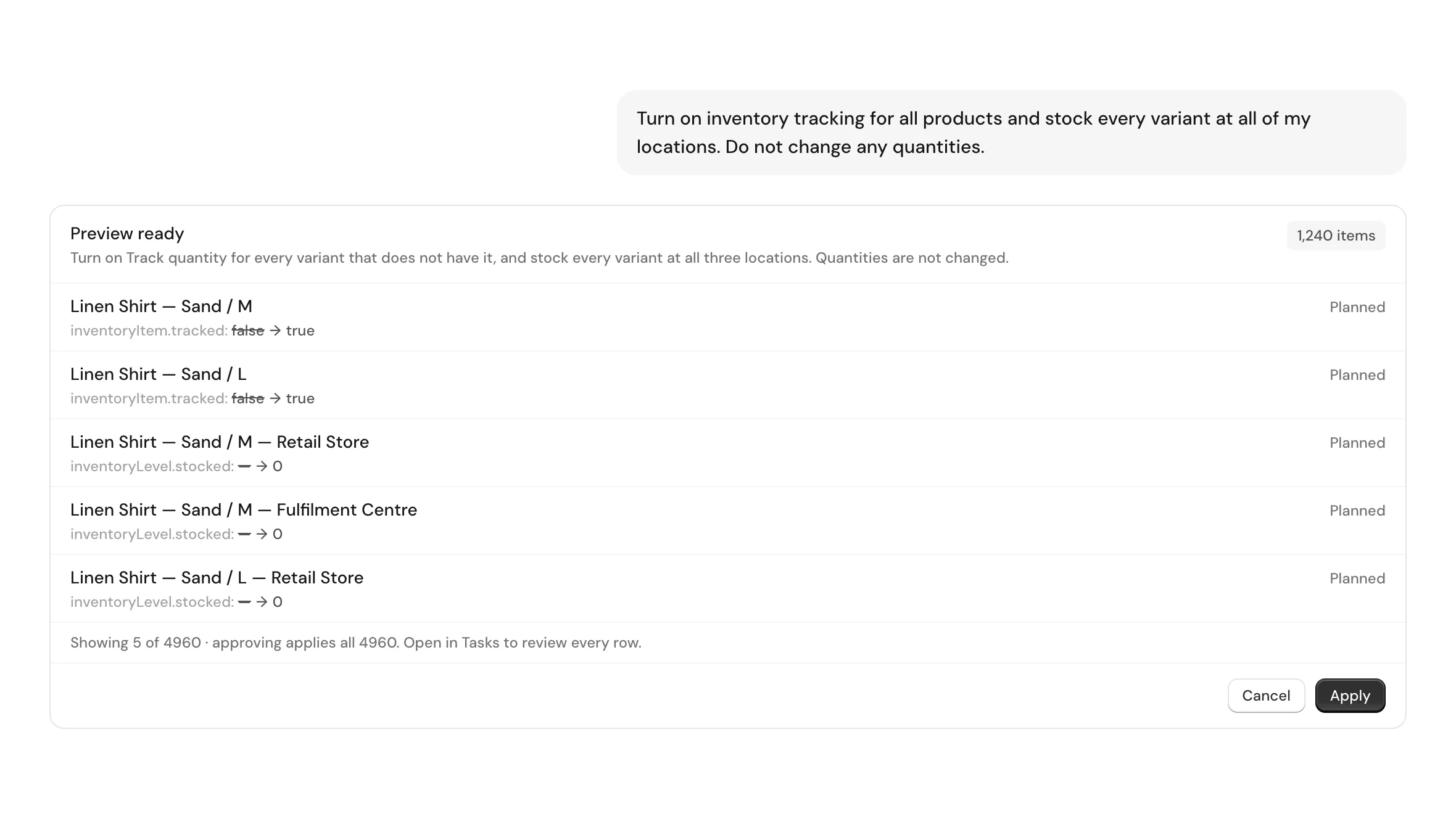
This job turns tracking on for every variant that still has it off, and activates every variant at every location you already have, in one plan. Existing quantities are not read as a number to be written back — they are simply left alone. A location that is newly attached to a variant opens at zero, which is the truth until someone counts the shelf.
It is a write, so it goes through preview and approval: you see how many variants get tracking, how many location rows get created, and which locations they are, before anything reaches the store. Nothing is created, renamed or deleted — no new locations, no new variants, no touched prices, SKUs or barcodes.
Who runs this job, and why now
The first reader opened a second or third location and discovered that the products already in the store did not follow. Shopify attaches new products to the locations that exist when they are created; it does not backfill. So the catalog splits into products that know about all your locations and products that know about one, and the split is invisible until an order routes to the wrong place.
The second reader has been overselling. Untracked variants read as available forever, so the storefront keeps taking orders after the shelf is empty. They found the "Track quantity" checkbox, discovered it is per variant, counted their products, and closed the tab. The checkbox is right; there are just several thousand of them.
The third is migrating from a channel that managed stock elsewhere — a marketplace, a POS, a supplier feed — and needs Shopify to become the system of record before the switchover. Tracking has to be on everywhere before any count means anything.
How this is done without ApiMate, and where each way breaks
In the Shopify admin you can bulk-edit Inventory and tick "Track quantity" for a page of variants at a time. It works, and it is the slowest of the three: the bulk editor pages, and a catalog in the low thousands is a long afternoon of ticking and waiting for saves. It also does not attach locations — that is a separate screen, per product.
A CSV export and re-import can set the inventory policy column, but the import is where quantities get hurt. The inventory columns in a Shopify product CSV carry quantities per location, so a round-trip that was meant to flip a boolean can overwrite counts with whatever was in the file when it was exported, or with blanks. People who have done this once do not do it twice.
The Admin API does it properly: `productVariantsBulkUpdate` sets `inventoryItem.tracked`, and `inventoryActivate` stocks an item at a location. That is two mutations, a paginated read to find what is missing, per-variant and per-location arguments, and rate-limit handling. It is an afternoon of scripting for a job you will run once.
The instruction, as written
Write the scope, the thing that must not change, and the thing that must not be created. The last one matters more than it looks: "do not create new locations" is what keeps a plan from inventing a location to hold the stock it is activating.
Ask for the preview explicitly. A plan that says "4,960 changes" is not the same as a plan that says "1,240 variants get tracking and 3,720 location rows get created at these three locations", and the second is what you want to read before approving.
Instruction
Turn on inventory tracking ("Track quantity") for all products and variants. Do not change the current inventory quantities. Stock every product and variant at all of my existing locations. Do not create, rename or delete any locations. Keep prices, SKUs and barcodes unchanged. Show me what will be affected and which locations will be selected before making the changes.
What the preview shows, and why the counts differ
Two different things are being changed, so the preview reports two different counts and they will not match. Tracking is one row per variant that currently has it off. Location activation is one row per variant per location that the variant is not yet stocked at. A catalog of 1,240 variants with three locations and nothing stocked anywhere yet produces 1,240 tracking rows and 3,720 location rows — 4,960 in one plan.
That asymmetry is the single most useful thing on the preview screen. If the location count comes back far smaller than you expected, the plan is only covering part of the catalog, and the reason is almost always a filter in your own instruction narrowing more than you meant.
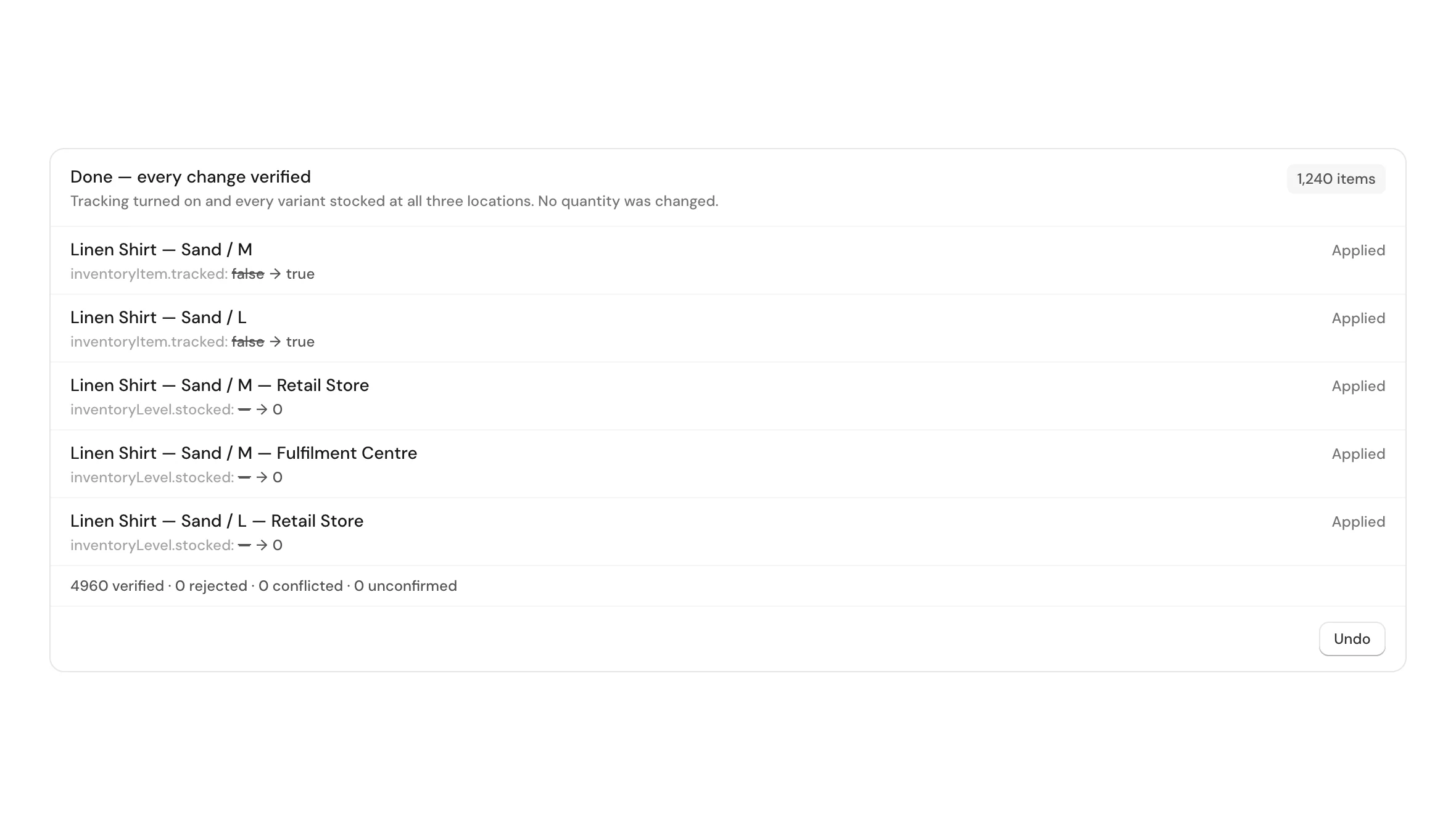
Every row names the field it changes — `inventoryItem.tracked: false → true` for the tracking rows, `inventoryLevel.stocked: — → 0` for the location ones — so the two kinds are legible in the same list without being counted together.
Watch the wording when you scope it
A very common way to write this instruction is to add "only where tracking is currently off" — sensible, because you do not want to re-write variants that are already tracked. Read it again before you approve, because that clause can narrow the whole job rather than just the tracking part.
The variants that already have tracking on are usually the ones most likely to be missing a location, since they are the oldest products in the store. Scoping the location work to the untracked set skips exactly the products that needed it. The counts on the preview are what catch this: if tracking is 1,240 rows and the location work is also roughly 1,240 rows, the location step inherited the filter.
Two ways to avoid it. Either drop the "only where off" clause entirely — setting `tracked: true` on a variant that is already tracked changes nothing and costs nothing — or split it into two runs: tracking first, then a second instruction that says "every tracked variant" for the locations.
Safer wording
Turn on Track quantity for every variant that does not have it. Separately, stock every variant in the store at all of my existing locations, including the ones that were already tracked. Do not change any quantities.
What happens to the numbers you already have
Turning tracking on does not set a quantity. A variant that was untracked had no count to preserve; it becomes tracked with zero on hand, which is accurate — nobody had counted it.
Activating a variant at a location it was already stocked at is not part of the plan, so the counts at your main location are not rewritten. Only the variant-location pairs that do not exist yet get created, and they open at zero.
This is worth saying plainly because it is the fear that stops people running the job: the worry is that a bulk inventory operation will flatten a year of counts. Read the preview for your main location. If the row count there is near zero, everything is already stocked there and nothing about it is being touched.
What it costs and how long it takes
Planning is one turn: the catalog is read, the gaps are worked out, and the plan is written. That is what the credits pay for. The apply afterwards is not charged again.
The apply is where the wall-clock time goes, because each location activation is its own call to Shopify and the API is rate-limited. A catalog in the low thousands runs in minutes, not seconds, and the job page shows rows as they land, so you can close the tab and come back.
Every row is verified after it is written, not assumed. The job reports how many were accepted and how many were confirmed in Shopify afterwards, and those two numbers matching is the point.
What to do next, once everything is tracked
Counting comes after tracking, not before. With every variant tracked and stocked everywhere, a stock count per location writes into rows that already exist, rather than creating them as it goes.
This is also the moment local pickup and ship-from-nearest start behaving, because routing needs a variant to exist at a location before it can choose between locations.
If the catalog came from an import, the same products usually carry supplier text and marketplace naming as well. Those are separate jobs and separate approvals.
- Run a stock count per location and write the real numbers in.
- Turn on local pickup or delivery for the locations that have stock.
- Check the "continue selling when out of stock" policy, which is a different setting from tracking.
- Clean imported variant names and descriptions if the catalog came from a supplier.
Questions
Will this overwrite my current stock numbers?+
No. Variants already stocked at a location are not in the plan for that location, so those counts are untouched. A variant newly attached to a location opens at zero, because it has never been counted there.
Does turning on Track quantity set everything to zero available?+
An untracked variant had no count to keep, so it becomes tracked at zero. That is not a loss — Shopify was not storing a number for it before.
Will it create new locations?+
No, and you should say so in the instruction anyway. The job only activates variants at locations that already exist in your store, and it never renames or deletes one.
Can I do this for one location only?+
Yes. Name the location in the instruction and the plan covers only that one. The preview will show a single activation block instead of one per location.
Why are the two numbers in my preview so different?+
They count different things. Tracking is one row per variant; location activation is one row per variant per location it is missing from. With three locations, the second number can be several times the first.
Can this be undone?+
Tracking can be turned back off from the job that set it. Deactivating a location on an item is a different operation and is not part of the revert, so treat the location attachment as the deliberate part.
Does it touch prices, SKUs or barcodes?+
No. The plan writes the tracking flag and the inventory level rows and nothing else. Say it in the instruction too, and the preview will show you it held.
What if some products should stay untracked?+
Scope it. Digital goods, services and gift cards usually should not be tracked; name the product type, tag or vendor to exclude and the preview will show the reduced count.
Is tracking the same as preventing overselling?+
It is the prerequisite, not the whole thing. Tracking makes Shopify count. Whether the storefront keeps selling at zero is the separate "continue selling when out of stock" policy on each variant.
Related
- Bulk update prices and inventory in Shopify, with undoWrite the real counts in once every variant is tracked.
- Clean up imported products and variants in ShopifyThe same imported catalogs usually carry supplier names and origin options.
- Bulk edit metafields in ShopifyDimensions and weights, the other fields an imported catalog is missing.
Run this on your own catalog
Install from the Shopify App Store. Every write shows its rows before it runs, and applied jobs can be reverted from history.