
Metafields, weight and dimensions are the fields the storefront filters on, the shipping calculator reads and the theme prints. They are also the fields most catalogs leave empty, because the admin edits them one product at a time and a spreadsheet needs the values already written in a column. ApiMate fills them from a rule, one row per product or variant, with the unit carried on the value, and shows every row before it writes.
The video below is one real run on seven Northline products. The material was already in the tags (recycled, ripstop, waxed) and the Material metafield, custom.material, was empty on all of them. One instruction produced a preview with six rows, one per product whose tags name a material. The beanie has no material tag, so it is not in the plan and its metafield stays empty. One approval wrote the six values, every one was read back from Shopify (6 of 6 verified), and the last shot is the product page in Shopify Admin with Material set to "waxed".
That read-back runs after every job; it is the check you cannot do by eye on a few hundred rows.
The unit travels with the value. A dimension metafield stores "40 cm", not "40". A weight is "1.2 kg", not "1.2". Put the unit in the instruction and check it on every row of the preview, because the difference between centimetres and millimetres is a shipping quote that is ten times wrong.
Who runs this job, and why now
A store adds a filter to its collection pages: material, or size range, or a "made in" flag. The theme reads a metafield for it. The metafield is defined, the filter is wired, and the collection page shows nothing, because the metafield is empty on every product. The values are known; they are in the tags, or the titles, or a supplier sheet. Someone has to move them.
A shipping carrier starts rejecting labels because the weight is missing or the parcel dimensions are zero. The fix is a weight on every variant and three dimensions on every product, with units the carrier accepts. This is the job merchants most often try to do in a spreadsheet and most often get the unit wrong on.
A new product line arrives with the same specification across every variant: the same weight, the same dimensions, the same care instructions. The admin bulk editor can show a metafield column, but it cannot apply a rule, and it cannot tell a product-level field from a variant-level one when the column heading looks the same.
How this is done without ApiMate, and where each way breaks
In the Shopify admin, a metafield is defined once under Settings, Custom data, then filled per product on the product page, or in the bulk editor by adding the metafield as a column and typing values into the grid. The grid works for a screenful of products. There is no rule ("from the tags"), no unit check beyond the field type, and no undo. Variant metafields are less consistent: the column appears for some products and not others, depending on the option set.
A spreadsheet tool exports the products with metafield columns, you fill the sheet, you import. This is the right path when the values already exist in a file from a supplier or a PIM. It is the wrong path when the values have to be derived, because the derivation happens in spreadsheet formulas, and a formula that concatenates "40" and "cm" with a stray space produces a value the dimension type rejects on import, or worse, accepts as text.
Weight is a separate problem in every tool because it does not live on the product or the variant; it lives on the variant's inventory item, with its own unit field. A CSV column "Variant Grams" writes grams regardless of what the merchant typed in their head. The number of stores with a 1.2-gram tent is not zero.

The instruction, as written
The instruction names the owner (product or variant), the field by namespace and key, the value or the rule, and the scope. Four things. Leaving any of them out produces a question back, not a guess, because a metafield write with the wrong owner type lands on the wrong object and does not show up on the product page where you would notice it.
The value can be a literal ("40 cm" for everything in scope) or a rule ("from the tags"). With a rule, a product whose data says nothing gets an empty value, not an invented one. "Fill custom.material from the tags (recycled, ripstop, waxed) and leave it blank when the tags say nothing" is a complete instruction: owner, field, rule, and what to do with the gaps.
Instruction from the video
Fill the Material metafield (custom.material) on every Northline product from its tags: recycled, ripstop or waxed. Leave it empty when no tag names a material.
- Owner: the product. "Metafield on every Northline product" is a product-level field, one row per product.
- Field: custom.material, by namespace and key. The definition existed already, as single line text.
- Rule: the value comes from the tags, and only these three words count as a material.
- Gaps: "leave it empty" is said out loud, so the product without a material tag is left out of the plan, not guessed.
- Scope: products from the vendor Northline.
What the preview showed
ApiMate reads the products in scope, resolves the metafield against the store's definitions, and lists one row per write. A product-level metafield is one row per product; a variant-level metafield and weight are one row per variant. The card's first line is the count ("Set 6 metafields"), and each row names the product with a link to it in Shopify Admin.
Each row shows the value in the store now and the value that will be written. In the run below every row reads "Value: — → waxed" or "— → ripstop": the dash means the metafield was never set. That distinction is kept through the job: undo of a row that was empty removes the metafield rather than writing an empty string, which matters for themes that test for presence.
| On the card | What it is | What to check |
|---|---|---|
| First line | What the job does and how many rows: "Set 6 metafields" | The count against your scope. Seven products, one without a material tag: six rows |
| Row title | The product (or variant, with its title), linked to Shopify Admin | Product rows for product fields, variant rows for variant fields and weight |
| Value | Current value → new value; a dash is "never set" | Empty where you expect empty; a filled current value means the scope includes hand-set products |
| Planned mutation input | The exact write, folded under each row: namespace, key, type, value | custom.material, not custom.materials; the type matches the definition |
| Store rules | How many of your saved store rules applied to this plan | A rule that skipped items says so here |
Owner and value are where metafield mistakes hide. Both are on every row.
Product metafields
A product metafield describes the product as a whole: material, care instructions, a merchandising flag, a size chart reference, copy the theme prints in a tab. One row per product. The rule can be a literal, or derived from tags, title, type, vendor or the description.
Deriving from tags is the common case because tags are where merchants have been storing structured data for years, before metafields existed. "Fill custom.material from the tags" reads each product's tags, matches the ones that name a material, and writes that material. Name the words that count, as the instruction above does; "from the tags" alone leaves the tool to decide which tags are materials. If a product can carry two of them, say which wins.
A blank is a blank. If the rule finds nothing, the product is left out of the plan and its metafield stays as it was; in the video, seven products went in and six rows came out. If you want a default, say so: "and write 'unspecified' when the tags say nothing" turns those gaps into writes.
Instruction
Fill the metafield custom.material for every product from its tags (recycled, ripstop, waxed) and leave it blank when the tags say nothing about material.
Variant metafields
A variant metafield describes one SKU: a fit note, a colour-specific material, a supplier reference, a per-size weight when the inventory item weight is not what the theme wants to show. One row per variant, with the variant title and SKU next to it so you can tell the size M row from the size L row.
Mixing the two levels is the most common cause of a bad metafield write. A material written to the variant when the theme reads it from the product shows nothing on the page, and the merchant concludes the job failed. The preview puts the owner on every row for that reason. If a job you meant as product-level shows variant rows, the instruction was ambiguous; decline and say "the product metafield".
The identifier matters more than the tool. A job keyed by SKU survives a rename; a job keyed by variant title does not. If your SKUs are clean, scope by SKU: "for SKUs starting with CMP-" is a scope the preview resolves exactly.
Weight and dimensions
Weight lives on the variant's inventory item and has a unit: grams, kilograms, ounces or pounds. Dimensions are usually metafields of type "dimension", which also carry a unit, and usually live on the product, because a parcel is a parcel regardless of size option. Say the unit in the instruction and check it in the preview. "1.2 kg" and "1200 g" are the same weight; "1.2" alone is a guess.
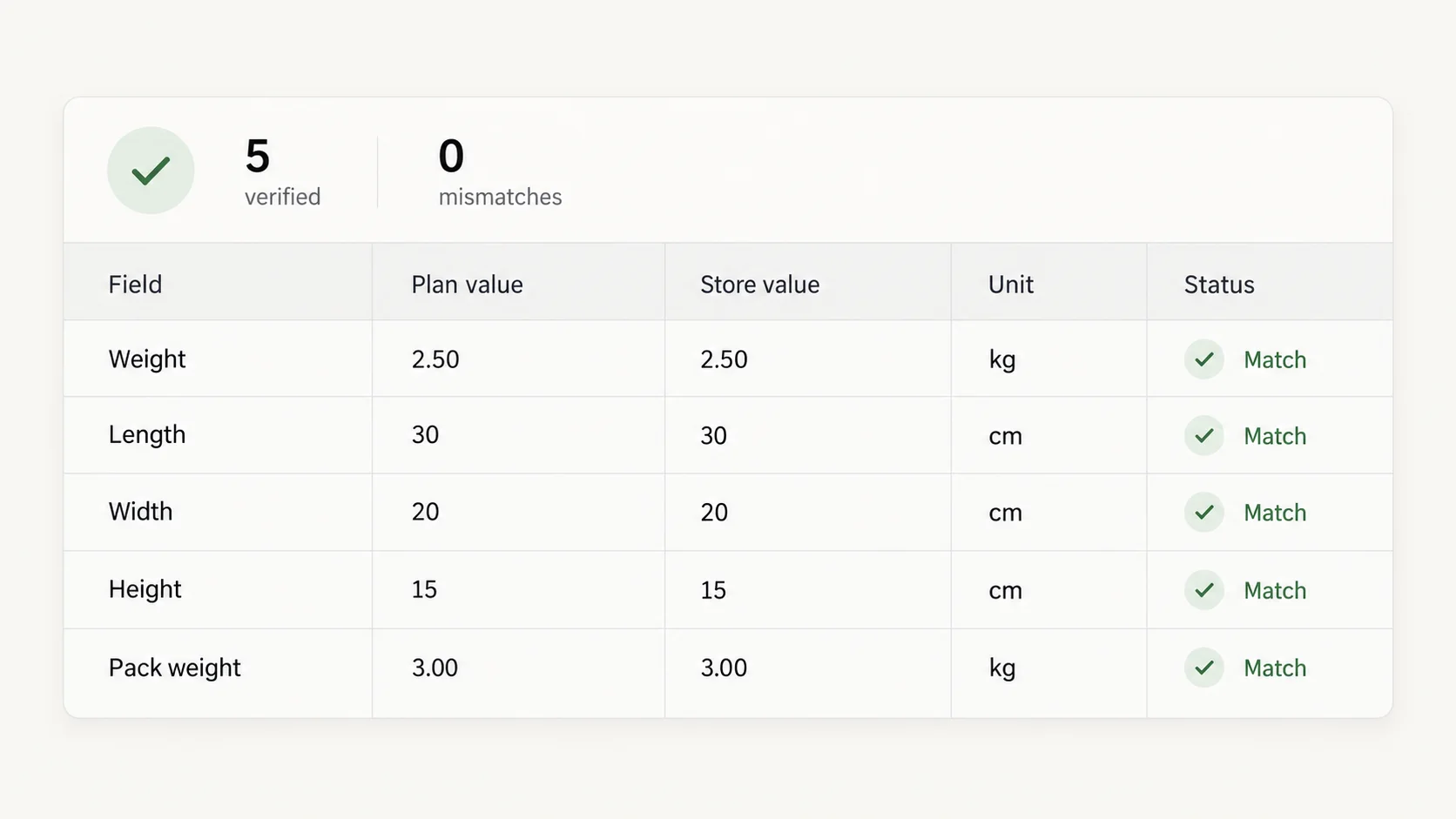
The job writes one weight per variant and three dimensions per product. After the write, every row is read back from the store and compared with what the plan said, unit included. A row that does not match is reported. This is the verification step, and it is the reason a merchant can approve a few hundred rows without opening them one by one afterwards.
Carriers want the shipping weight, which includes packaging. If your catalog stores product weight, say "add 0.2 kg for packaging" and the rule does it per row. Do not write the packaged weight into a field the theme prints as product weight.
Specifications inside descriptions
Some themes do not render metafields, so merchants want the structured data printed at the end of the description as well. That is a description write, per product, with the existing text kept and a block appended: "Weight: 1.2 kg. Dimensions: 40 × 30 × 20 cm." Keep it as a second job after the metafields are filled, so the description reads from data that already exists and the two never disagree.
The preview for that job shows the whole new description per product, because the write is the whole description. Check that headings and images inside the description survived; the block is appended, nothing else moves.
Before you approve
Metafield mistakes do not show on the product page. They show up a week later as a broken filter or a rejected label. Check these before the write, not after.
- Namespace and key on the row match the definition you meant. custom.height is not custom.length.
- Owner type: product rows for product fields, variant rows for variant fields and weight.
- Units: the value reads "40 cm", not "40". Weight reads "1.2 kg", not "1200" unless you meant grams.
- Blanks: the products missing from the rows are the ones whose data says nothing. Count them against the scope.
- Count: one row per product for product fields, one per variant for variant fields and weight. Two counts, both as expected.
What happened after approval
One approval writes every row. When it finishes, the read-back runs: every value is read from Shopify again and compared with the plan. In the video the card ends on "Done — every change verified" and "6 of 6 verified". The task stays in Tasks with its rows and the values they replaced.
To see the result in Shopify, open a product and scroll to the metafields section at the bottom of the page; the values are there with their units. Weight is on each variant's inventory panel. Collection filters that read the metafield pick it up on their next index, which is minutes. A shipping calculator reads weight at checkout, so the next test order shows the new quote.
Revert
Each metafield write stores the previous value, including "no value". Undo on the finished task builds a new preview of the reverse writes: old values go back, and metafields that were empty before are removed. Products that were left out of the original job are not in the undo, because nothing was written to them.
Removing a metafield is a delete, so this preview is stricter than the original one. It says the change cannot be undone and asks you to tick "I understand this permanently destroys data" before Apply. After the undo of the run in the video, the Material field on the waxed jacket is empty again in Shopify Admin.
Revert does not remove a metafield definition. If a definition was created by hand for the job, it stays under Settings, Custom data. Delete it there if you no longer want it; deleting a definition removes the values on every product, which is why it is not something a revert does on its own.
Where the tool stops
The definition must exist. ApiMate writes to defined metafields; it does not invent a namespace or create a definition as a side effect of a write. If the instruction names a field that is not defined, the plan says so and stops. Creating the definition is a one-time step in the admin, and the type you pick there (dimension, weight, text) is what the preview validates against.
A migration from a PIM or a supplier feed with the values already in columns is a file job. The file is the truth; a sentence would only add a step. The comparison page with Matrixify covers that line.
Values that are not in the product data are not invented. If the tags say nothing about material, the material stays blank. There is no lookup of the product on the internet to fill the gap.
Metaobjects (structured entries that metafields point to, like a "designer" record) are read, and references to existing entries are written. The entries themselves are created one at a time in the admin.
Other ways to say the same job
These resolve to plans of the same shape. The owner column tells you whether the tool read "product" or "variant" the way you meant.
- "Set the weight of every Camping variant to 1.2 kg."
- "Weight in kg and length, width, height in cm for all snowboards: 3.5 kg, 160 × 30 × 12."
- "Fill custom.material from the tags for every product that has one of: recycled, ripstop, waxed."
- "Every variant with SKU starting CMP-: set the variant metafield custom.fit to 'regular'."
- "Add 0.2 kg to the weight of every variant from Basalt Works."
- "Which products have no weight on any variant?" (A read. Then fix them.)
- "Copy the product's custom.material into custom.material_label on every variant."
Terms used on this page
- Metafield: a custom field on a product, variant or other object, defined per store with a namespace, a key and a type.
- Namespace and key: the two-part name of a metafield, written namespace.key. custom.height and custom.length are different fields.
- Owner: the object the metafield is attached to. Product-level and variant-level fields with the same key are different fields.
- Definition: the store-level declaration of a metafield, made under Settings, Custom data. A write needs one.
- Dimension type, weight type: metafield types that carry a unit with the value.
- Inventory item: the object under a variant that holds weight, cost and tracking settings.
- Read-back: the check after a write that reads every row from the store and compares it with the plan.
Questions
Do I need the metafield definition first?+
Yes. Create it under Settings, Custom data, with the right type. A dimension type carries a unit; a single-line text does not. The instruction then names the namespace and key.
Can it write variant metafields?+
Yes. Variant metafields are rows per variant, with the variant title and SKU on the row. Scope by SKU when your SKUs are clean.
What if my tags do not say the material?+
The metafield stays empty and the product is not in the plan. The tool does not guess. If you want a default, put it in the instruction.
Does weight need a unit?+
Always. Write "1.2 kg" or "1200 g", and check the unit on the preview rows before you approve. A bare number leaves the unit to a guess.
Can I undo a metafield job?+
Yes. Previous values are saved per row, including empty ones. Undo builds a new preview that restores them and removes metafields that had no value before. Because that removal is a delete, the preview asks you to confirm it with a checkbox before Apply.
How do I know the values landed correctly?+
After the write, every row is read back from the store and compared with the plan, units included. The card reports the count, for example "6 of 6 verified", and lists any row that does not match.
Can it fill dimensions for a shipping calculator?+
Yes, as dimension-type metafields on the product with units in cm or in, and weight on each variant. Whether the calculator reads them depends on the carrier app; most read weight from the variant and dimensions from a metafield you name in the app settings.
Can it create metaobject entries?+
No. It writes references to existing metaobjects. The entries are created in the admin.
Related
- What are metafields in ShopifyMetafield types, definitions and how to bulk edit them.
- Bulk edit product weight in ShopifyWeight units, CSV columns and checking weights before checkout.
- Bulk edit SEO titles and meta descriptions in ShopifyGenerated text per row, through the same preview.
- Audit a Shopify catalog before a Google Merchant Center reviewMissing weight is one of the checks.
- ApiMate vs MatrixifyWhen the values already sit in a spreadsheet.
Run this on your own catalog
Install from the Shopify App Store. Every write shows its rows before it runs, and applied jobs can be reverted from history.