
ApiMate vs Matrixify
Compared as of 2026-09-14 · Matrixify source
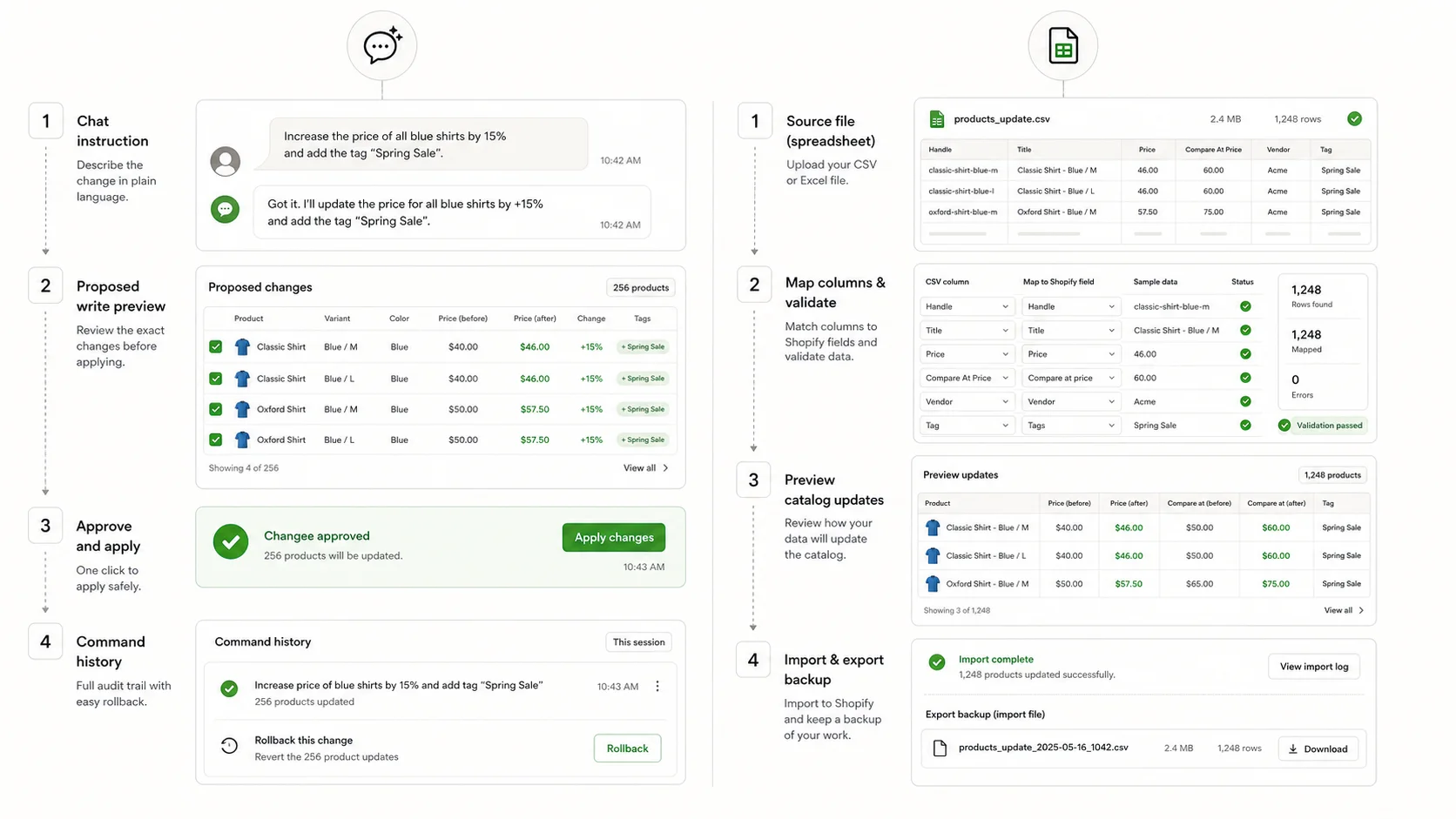
Matrixify is the spreadsheet tool for Shopify: export a slice of the store to Excel or CSV, edit it, import it back, with a 20 GB ceiling and the broadest migration coverage on the App Store. ApiMate is a chat that turns a sentence into a previewed write. They are not really competitors. They are the two ends of the same question: does the change already exist as a file, or does it exist as a rule someone can say?
| Feature | ApiMate | Matrixify |
|---|---|---|
| Starting point | A sentence in chat | A spreadsheet or CSV |
| Where the values come from | A rule, a question, or an uploaded sheet | The file |
| Preview | Every row: current, new, reason in scope | The file is the preview; import log afterwards |
| Approval before write | Required on every write | Running the import is the approval |
| Undo | Per job from history; saved values | Re-import a prior export |
| Migrations between platforms | No | Category leader: WooCommerce, Magento, BigCommerce, Lightspeed |
| Scheduled feeds | No | Yes, with FTP and SFTP |
| File size | Not a file tool | Up to 20 GB |
| Generated text | Per row, previewed | Whatever is in the file |
| Reads and audits | Any question, no approval | Export and filter in the spreadsheet |
| Free plan | Yes; audits and small jobs on any catalog size | Yes, with feature and volume limits |
| Paid entry | See pricing | $20/mo Basic, $50 Big, $200 Enterprise |
What Matrixify is
Matrixify (formerly Excelify) is the import and export tool that serious Shopify migrations run on. The flow is file-first: export products, variants, metafields, orders, customers, collections, pages, blog posts or metaobjects as an Excel or CSV workbook, edit it, import it back. The same flow moves a catalog from WooCommerce, Magento, BigCommerce or Lightspeed into Shopify, and merges two Shopify stores.
The export is the part people underrate. One sheet per resource, every column Shopify exposes, including metafields and inventory per location, and the column names match the import format. The usual safe pattern is export, filter in the spreadsheet, delete the rows you are not touching, change the column you are, re-import with "update only", which refuses to create anything.
Jobs can be scheduled and repeated, with FTP and SFTP for supplier feeds. The import ceiling is 20 GB, far past where other apps stop. Rollback is a re-import of a prior export rather than an undo button. The App Store listing, as of the May 2026 check, shows 4.9 with over twelve hundred reviews and the Built for Shopify badge.
What ApiMate is
ApiMate is a chat that reads and writes your store. The request is a sentence with conditions: "every product from Cedar & Pine that has no weight: set the weight metafield to 0.4 kg, and list the ones where the vendor is empty". ApiMate reads the catalog, resolves the target set and the rule, and shows a preview: one row per product or variant, current value, new value, the reason it is in scope. Nothing writes until you approve.
After approval the job runs, is stored in history with the values it replaced, and can be reverted with one instruction. Reads need no approval and produce a report. Writes always go through the preview.
ApiMate also takes an uploaded sheet as the source of values: "load the dimensions from this sheet by SKU" is a job with a per-row preview and a list of SKUs that did not match. For a small sheet that is convenient. For a large one, Matrixify is faster, and this page says so.
The same job, both ways
A job that sits right on the line: a supplier sends a sheet with 1,800 SKUs and new cost prices. The store needs the price set to cost times 2.2, rounded to .99, but only where the new price is higher than the current one; where it is lower, keep the current price and flag the row.
In Matrixify: export variants, add the supplier sheet as a second tab, VLOOKUP the cost by SKU, formula the new price, a second formula for the flag, filter to the rows where the new price is higher, delete the rest, keep the Variant SKU and Variant Price columns, import with update only. Check the import log. To revert, re-import the original export.
In ApiMate: upload the sheet and send the sentence below. The preview shows every variant with the cost, the current price, the new price, and the flag on the rows kept at the current price. Approve. Revert by name later.
Both work. The spreadsheet route is faster for someone fluent in VLOOKUP, and its output is a file you can keep. The chat route is faster for someone who is not, and its output is a history entry with the saved values. The condition ("only where higher") is the part that tips it: it is a formula and a filter in the file, and a clause in the sentence.
Instruction
From the uploaded sheet, match variants by SKU. Set the price to cost times 2.2, rounded to .99, but only where that is higher than the current price. Where it would be lower, keep the current price and flag the row in the preview.
| Step | Matrixify | ApiMate |
|---|---|---|
| Get the current values | Export variants | Read; nothing to do |
| Join the supplier sheet | VLOOKUP by SKU in the spreadsheet | Upload; matched by SKU |
| Apply the rule | Formula per row | One clause |
| Apply the condition | Second formula, filter, delete rows | Second clause |
| Preview | The filtered sheet | Row table with the flag |
| Write | Import, update only; read the log | Approve |
| Revert | Re-import the original export | One instruction, from history |
| Unmatched SKUs | Blank cells in the lookup | Listed as skipped in the preview |
The sheet route gives you a file. The chat route gives you a history entry. Pick by which one you will actually check.
Where Matrixify is the better tool
Matrixify wins whenever the values already exist as a file and the job is to get them into Shopify accurately. Nothing about a sentence improves that job.
- A migration between platforms or a merge of two Shopify stores. Matrixify is the category leader and nothing else on this site claims otherwise.
- A supplier catalog with thousands of rows, images and SKUs. The values exist; map the columns and import.
- A scheduled feed over FTP or SFTP that updates prices or stock on a cadence.
- A full-store backup as a workbook, re-importable, kept outside Shopify.
- A team that lives in spreadsheets. Their tooling, their formulas, their checks are already there.
- Very large files. The 20 GB ceiling is the highest published number among the apps merchants compare.
Where ApiMate is the better tool
ApiMate wins when the change is a rule rather than a set of values, when there is a question to answer first, when the text has to be written per row, or when the preview and the revert should live in the tool rather than in a file you have to keep.
- A rule with conditions and exceptions. "Except anything already on sale" is a clause, not a filter-and-delete in a sheet.
- A question before the write. "Which products have no alt text on any image?" is a report with no approval; the fix is the next sentence.
- Per-row text: alt text from the image's product, meta descriptions from the description, a title rewritten to a pattern with exceptions. A file carries values, not writing.
- Structural edits that a CSV round trip handles badly: deleting an option, renaming variants without collisions, reordering variants by price.
- A revert that is one instruction and puts back exactly what was there, without a gap between the export and the re-import.
- A small change on a large catalog where exporting everything to change forty rows is the wrong proportion.
Preview and undo, compared
This is the section where the two tools are most different, because the file model has no preview step separate from the file, and no undo separate from a prior export. Both are workable. Both require discipline the tool does not enforce.
| Question | Matrixify | ApiMate |
|---|---|---|
| What is the preview? | The file you are about to import | A row table: current, new, reason |
| Who checks it? | You, in the spreadsheet | You, in the preview; the scope line first |
| Is approval required? | Running the import | Every write waits; reads do not |
| What is saved for undo? | Nothing, unless you exported first | Previous values per row, in job history |
| How do I revert? | Re-import the prior export | One instruction |
| What does the revert miss? | Anything changed between export and re-import | Nothing in the job; other jobs are separate |
| Partial failure? | Import log lists failed rows; the rest are in | Per-row report; revert covers the rows that wrote |
The re-import revert works. Its gap is time: an order that changed stock between the export and the re-import is overwritten.
Pricing, compared
Matrixify is priced by tier: Free with feature and volume limits, Basic at $20 a month, Big at $50, Enterprise at $200. The tiers gate file size and features like scheduling and FTP. A migration usually needs one month of a high tier and then a downgrade; a store that runs supplier feeds stays on the tier that fits the feed. You pay for capacity, not usage: a quiet month costs the same as a busy one.
ApiMate has a free plan and paid plans by usage. The free plan runs audits and small jobs on any catalog size; the estimate for each job is shown as a range before it runs, and a job cannot spend past the balance. Paid plans add larger jobs and longer history. A month with no jobs costs nothing on the free plan.
For a store that does one migration and then daily catalog work, the pattern most people land on is Matrixify for the migration month and ApiMate for the daily work. For a store that runs feeds, Matrixify stays. Neither replaces the other's job, so "which is cheaper" is really "which jobs do you have".
Scale: large catalogs
Matrixify is built for scale in the file sense: 20 GB imports, tens of thousands of rows, scheduled and resumable. For a catalog that size, the file is the right container, and the checks happen in the spreadsheet before import.
ApiMate has no per-product cap, and a large catalog changes the estimate, not the eligibility. A rule applied to a large catalog produces a long preview; the scope line is the number to read first, and the rows are paginated below. Long jobs report per batch and can be revoked partway, with the written rows revertable as a set. Reads scale the same way: an audit of a large catalog is a longer report.
The split at scale is the same as at small scale: values in a file go through the file tool; rules and questions go through the sentence. What changes is that the cost of getting either wrong is larger, so the preview and the export-before-import matter more.
Metafields and structure
Matrixify exports and imports metafields as columns, one per definition, typed by the definition. For loading a supplier's weights and dimensions into metafields on thousands of variants, it is the fastest route: map the columns, import.
ApiMate edits metafields from a sentence or a small sheet, with a per-row preview that shows the typed value and the unit, proposes missing definitions before the write, and lists unmatched rows as skipped. Structural edits, deleting an option or renaming variants across products, are where the sentence is safer than the file: a CSV round trip that removes an option column collides on re-import, and ApiMate previews the delete by variant and refuses to leave a product with none.
The split: values from a large sheet, Matrixify. Values by rule, structural edits, or anything preceded by a question, ApiMate.
The two-tool stack
Most stores past a few thousand products end up with both. Matrixify owns the file jobs: migration, supplier catalog, scheduled feed, backup workbook. ApiMate owns the sentences: the request from the founder, the cleanup after the import, the question that turns into a fix.
The cleanup after the import is the most common handoff. A supplier catalog goes in through Matrixify with the supplier's structure, and the next day the sentences start: remove the "Ships From" option, rename the variants, strip the supplier text from descriptions, write alt text. Those are per-product structural and text jobs, and they are the ones a file round trip does worst.
Clean split
Matrixify moves values that already exist. ApiMate applies rules, answers questions and writes per-row text. Import with the file; clean up with the sentence.
What to test before choosing
The test is not "which is better". It is "which of my jobs are files and which are sentences". Take the last five bulk changes and sort them.
- Did the values exist as a file before the job started? File tool.
- Was there a condition or an exception in the request? Sentence.
- Did you need to ask the store a question before deciding what to change? Sentence.
- Was the text per row (alt text, descriptions)? Sentence.
- Was it a migration, a feed, or a backup? File tool.
- Run the revert in both. Note what the re-import missed.
Where each tool stops
Matrixify has no rule engine. The file carries values, and the rule lives in your spreadsheet. It has no per-row preview separate from the file and no undo separate from a prior export. Structural edits through a CSV round trip are the place merchants get hurt.
ApiMate is not a file tool. It refuses migrations and large supplier imports and points at Matrixify. It does not schedule feeds. Small sheets are fine; large ones are the wrong proportion.
Neither creates barcodes, brand names or product photos. Those come from the supplier.
Terms used on this page
- Update only: a Matrixify import option that changes existing rows and refuses to create new ones. The safety net for a sheet edit.
- Import log: Matrixify's per-row result after an import. The place to look for rows that failed.
- Re-import revert: restoring values by importing a prior export. Works; misses anything changed in between.
- Scope line: in ApiMate, the count and description of the target set above the preview.
- Read: an ApiMate instruction that produces a report and writes nothing. No approval.
- Structural edit: a change to options, variants or their order, as opposed to a field value. The class of edit a CSV round trip handles worst.
- Feed: a scheduled import from a supplier over FTP or SFTP. A Matrixify job.
Frequently asked questions
Is ApiMate a replacement for Matrixify?+
No. Matrixify owns migrations, supplier files and scheduled feeds. ApiMate owns rules, questions and per-row text. Most stores use both.
Can ApiMate import a CSV?+
It takes a small uploaded sheet as the source of values, matches rows by SKU or handle, and previews per row. For thousands of rows with images, Matrixify is faster and ApiMate says so.
Which has better undo?+
ApiMate reverts from job history with the saved values, in one instruction. Matrixify reverts by re-importing a prior export, which works but misses anything that changed between the export and the re-import.
Which is better for metafields?+
Loading a large sheet of values into metafields: Matrixify. Setting metafields by rule, or after asking which rows are missing: ApiMate. Both are typed.
Which is better right after a supplier import?+
ApiMate. The cleanup jobs (remove an option, rename variants, strip supplier text, write alt text) are structural and per-row text jobs, which a CSV round trip handles worst.
Which is cheaper?+
They do different jobs. Matrixify is a flat tier from $20; a migration usually needs one month of a higher tier. ApiMate is a free plan plus usage pricing. A store with both file jobs and sentence jobs pays for both and uses each for what it does.
Does ApiMate do migrations?+
No. It refuses and points at Matrixify. A migration is a file job.
What should I test first?+
The revert. Export ten products in Matrixify, change a tag, import, re-import the export. Then the same in ApiMate: tag, revert. Note what each one restored and how long it took.
Related pages
- Clean up AliExpress and DSers imports in ShopifyThe cleanup after the import: options, variants, supplier text.
- Bulk edit metafields, weight and dimensionsMetafields by rule and from a small sheet, with a preview.
- Bulk editor vs CSV vs APIThe decision guide across the admin, a file, a task app and a sentence.
Try ApiMate on a real Shopify catalog
Install from the Shopify App Store. Every write is reviewed before it runs, and any change can be rolled back from the command history.