
A metafield is a custom field Shopify lets you add to products, variants, collections, customers, orders and other objects. Each one has a namespace and a key (written custom.material), a type such as single line text, dimension or file, and a value per product. You add one for free in the admin: Settings, Custom data, pick the object, add a definition, then fill the value on each product page or in the bulk editor by adding the metafield as a column.
It breaks at scale and at the edges. The bulk editor takes typed values per cell with no rule and no undo, variant metafields cannot travel in the product CSV, and a list metafield is replaced whole on every write, so "add linen to the materials" means rewriting the list. Units on dimension and weight metafields are part of the value, and a wrong unit still passes validation.
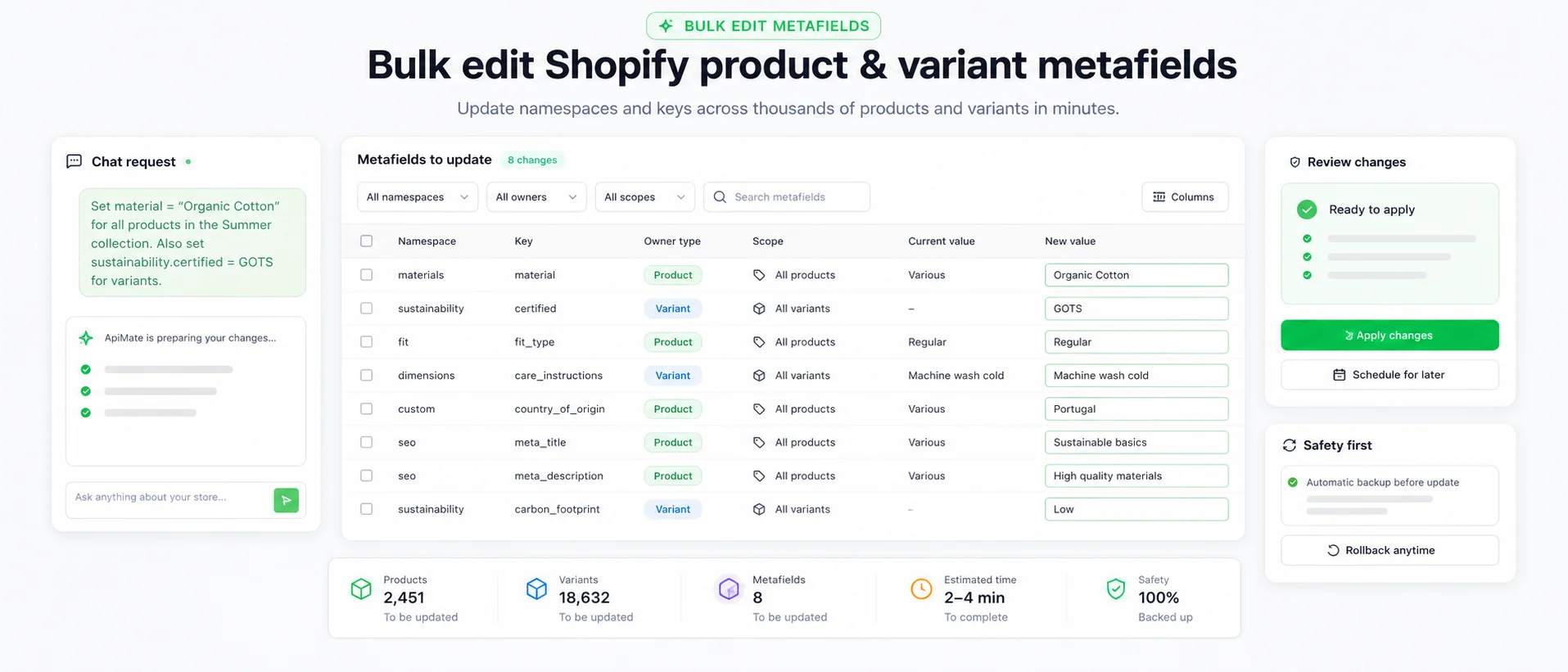
Those limits are where the tools differ. Admin and CSV are free and fine for typed values on a screen of products. Apps add formulas and variant columns. ApiMate, whose free plan covers small jobs, takes "set custom.material to Linen on every product tagged linen", resolves the field against your definitions, and shows each product with its current and new value before anything is saved.
What a metafield is
Shopify gives every product a fixed set of fields: title, description, price, SKU, weight, tags. Anything else a store needs to keep per product, such as material, care instructions, a size chart, a burn time or a country of origin, goes into a metafield. It is a named slot attached to one object, holding one value of one type.
The name has two parts. The namespace groups related fields and the key names the field, so custom.material and custom.care_instructions are two fields in the custom namespace. custom.material and custom.materials are also two fields, which is how most metafield mistakes start.
Metafields are not only for products. Variants, collections, customers, orders, locations and the shop itself can carry them. A product metafield holds one value for the whole product; a variant metafield holds one value per size or color.
Definitions and values
A metafield has two halves. The definition is created once per store under Settings, Custom data, and says which object it belongs to, its name, its namespace and key, its type and any validation. The value is set per product, per variant or per collection, against that definition.
The definition owns the type. If custom.burn_time is defined as an integer, a value of "40 hours" is rejected; if it is defined as single line text, "40 hours" is accepted and a collection filter cannot sort by it. Pick the type for how the value will be used later.
A value can exist without a definition, usually because an app or an import wrote it. Such a value is stored but not validated, and it does not show in Settings, Custom data or on the product page. Creating the definition later brings it under the type and makes it editable.
To make a defined product metafield show in the product page editor, it needs to be pinned. Unpinned definitions still hold values, but the admin hides them, so a field you created through an app can look missing when it is not.
Types that matter in bulk
Shopify offers text, numbers, dates, true or false, color, URL, money, rating, file, references to products, variants, collections, pages or metaobjects, measurements and JSON. Most of them also have a list version that holds several values.
- Single line text: short labels like a material or a country. Accepts almost anything, so it catches the least.
- Integer and decimal: numbers that filters can sort and range. Use them for anything a customer will compare.
- Dimension, weight, volume: a number with a unit, stored together. "40 cm" and "40 mm" are both valid. Shipping weight itself is a variant field; see bulk editing product weight.
- File and reference: point to an uploaded file or another object. The value is an ID, not a name or a URL you type.
- List types: several values in one field. A write replaces the whole list; there is no append.
Metafields and metaobjects
A metafield holds a value for one object. A metaobject is a record of its own, with several fields, that many objects can point to. A size chart, a designer profile or a set of care instructions shared by 200 products is a metaobject, and each product holds a reference metafield to it.
The difference shows up when the content changes. Care instructions typed into 200 product metafields need 200 writes to update; a care metaobject referenced by 200 products needs one. Use a metaobject when the same block of content repeats across products, and a plain metafield when the value is specific to each one.
Metaobject entries can have a status of their own. An entry left as draft renders nowhere, even when products reference it, so a new size chart that does not show is worth checking there first.
Category metafields
When a product has a category from Shopify's standard product taxonomy, the admin suggests metafields that fit that category, such as color, size or fabric for apparel. These are defined by Shopify, not by you, and the category decides which ones are offered.
They behave like other metafields once filled: they show on the product page, can feed storefront filters and can be read by the theme. The difference is setup. You assign the category instead of creating a definition, so the first bulk step for category metafields is getting the right category on every product.
How metafields reach the storefront
A value in a metafield shows nowhere on its own. The theme decides. In the theme editor, a block setting that supports dynamic sources can be connected to a metafield, so a "Material" text block reads custom.material from whichever product is open.
Storefront filters can also read metafields, which is the main reason to use integer, decimal or list types instead of free text. A filter on a single line text field lists every spelling separately: Linen, linen and Linen 100% are three options.
Apps and integrations read metafields too: shipping calculators, feeds and review widgets. That is why the namespace and key matter beyond the theme. An app expecting custom.length will not read custom.depth.
Where a metafield is created
Settings, Custom data, choose the object (Products, Variants and so on), then add a definition. Give it a name, accept or edit the namespace and key, pick the type and any validation, and save. Then open a product and fill the field in the metafields section, or add it as a column in the bulk editor.
Decide two things before you save the definition. First, product or variant: a care label is one per product, a bar length is one per size. Second, the type: a value written into the wrong type has to be rewritten later, product by product or in bulk.
Filling one field on many products
A definition says what a field accepts; it does not fill anything. Values get into the field through four routes, and they differ in what they can reach and in what survives a mistake.
Metafields in the bulk editor
Select the products, click Bulk edit, click Columns and add the metafield. Each product gets a cell. Type values or select several cells and set one value, then Save. Values that break the definition, such as text in an integer field or a value outside the allowed choices, come back as errors to fix before the save completes.
This is the best method for a screen of products and a value you can type. It has no rule ("material from the tag"), no unit conversion and no undo. Variant metafield columns are less predictable, because the grid is built around products and their options. The same strengths and gaps apply to every field, as the guide to bulk editing Shopify products shows.
Metafields in the product CSV
The product CSV carries product metafields as extra columns. The header is the name followed by the field in parentheses, for example "Material (product.metafields.custom.material)". Export once with the metafield filled on one product to see the exact header Shopify expects, then fill the column and import with "Overwrite products with matching handles".
Variant metafields are not supported in the product CSV. A per-size measurement, a per-color swatch file or anything else on the variant needs the bulk editor, an app or the API. The same blank-cell rule applies as with every other column: with overwrite on, an empty cell in a column you include blanks the value.
Metafields in apps and ApiMate
Bulk-edit apps add filters, formulas and variant metafields, and the larger ones import spreadsheets with any metafield column. That is the route for a catalog migration with thousands of values that already exist in a file.
In ApiMate the instruction names four things: the owner (product or variant), the field by namespace and key, the value or the rule, and the scope. It reads the store's definitions, matches the value to the definition's type, and shows one row per write with the current and new value. The metafield bulk edit case walks through a full job with dimensions and weight.
Revert writes back the old value for every metafield that existed before the job. A metafield the job created had no old value, so undoing it means deleting it, which is a separate delete with its own confirmation. A definition is never removed by a revert, because deleting a definition removes its values on every product. The guide to undoing bulk edits compares this with the admin and CSV.
Traps that cost a re-run
These show up after the save, usually as a blank block on the product page or a filter with the wrong options.
- Wrong namespace or key: custom.material and custom.materials are different fields. The value lands, and the theme reads the other one.
- Wrong owner: a value written to the variant does not show where the theme reads the product, and the reverse.
- Wrong unit: dimension and weight values carry their unit, and nothing checks that the unit is the one you meant. Read the unit on a sample row.
- Lists replace whole: writing ["linen"] to a field that held ["cotton", "linen"] drops cotton. Read the current list first.
- Clearing is deleting: an empty value is not a cleared field. Removing a value is a delete.
- No definition: a value written without one is stored but unvalidated and hidden in the admin.
Which method for which job
Match the method to where the values come from and which object owns them.
| Job | Bulk editor | CSV | App | ApiMate |
|---|---|---|---|---|
| Set Material on 40 products | Best: one column, one value | Fine | Fine | Fine |
| Material from each product's tags | Type each value | Formula in the sheet | Rule action | One sentence, previewed |
| Per-size measurements on variants | Variant columns, inconsistent | Not supported | Supported | One row per variant |
| Import 5,000 spec values from a supplier file | No | Best for product fields | Best for variant fields | Small lists only |
The product CSV stops at product metafields. Variant metafields need the bulk editor, an app or the API.
Terms used on this page
- Metafield: a custom field on a product, variant or other object, holding one typed value.
- Namespace and key: the two-part name of a metafield, written namespace.key.
- Definition: the store-level declaration of a metafield under Settings, Custom data. It sets the owner, type and validation.
- Pin: the setting that shows a product metafield definition on the product page in the admin.
- Category metafield: a metafield Shopify defines for a product category in its standard taxonomy.
- Dynamic source: the theme editor link from a block setting to a metafield.
Questions
What are metafields in Shopify?+
Custom fields you add to products, variants, collections and other objects. Each has a namespace, a key, a type and a value per object.
How do I add a metafield in Shopify?+
Settings, Custom data, choose the object, add a definition with a name and type, save. Then fill the value on each product or in the bulk editor.
How do I show a metafield on my store?+
In the theme editor, connect a block setting to the metafield through a dynamic source. A value shows nowhere until the theme reads it.
Can I bulk edit metafields in Shopify?+
Yes. Add the metafield as a column in the bulk editor, use a product CSV for product metafields, or use an app for rules and variant metafields.
Can I import variant metafields with a CSV?+
Not with the product CSV. Shopify supports product metafields there, not variant metafields.
What are category metafields?+
Metafields Shopify defines for a product category in its standard taxonomy, such as color or fabric. Assigning the category makes them available.
Why does my metafield not show on the product page?+
Usually the definition is not pinned, there is no definition, or the value is on the variant while the page shows product fields.
Related
- How to bulk edit products in ShopifyAdmin, CSV, apps and chat, and which fields each one reaches.
- Bulk edit Shopify metafields, weight and dimensionsA full metafield job: owner, namespace, key, unit and revert.
- How to bulk edit product weight in ShopifyWeight is a variant field, not a metafield, and the CSV stores it in grams.
- How to undo a bulk edit in ShopifyWhat each method gives you after a bad write.
- How to bulk edit variants in ShopifyPrice, SKU, stock and other per-variant fields, edited across many products.
Run this on your own catalog
Install from the Shopify App Store. Every write shows its rows before it runs, and applied jobs can be reverted from history.