
ApiMate vs QuickEdit
Compared as of 2026-09-14 · QuickEdit source
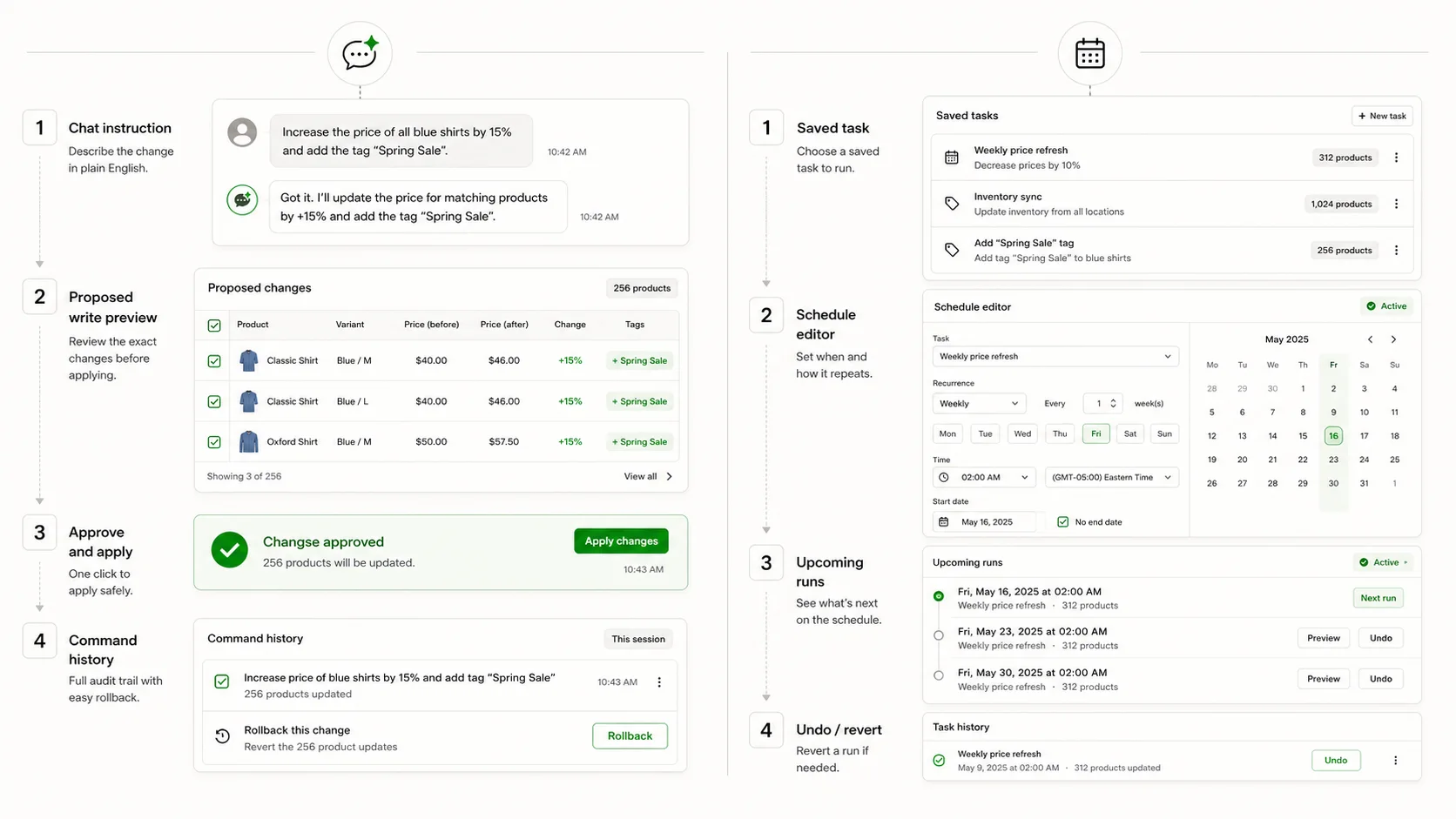
QuickEdit is a focused bulk editor with one clear idea: save a task, run it again, put it on a schedule. It has the lowest paid tier of the editors merchants compare and the smallest install base. ApiMate is a chat that turns a sentence into a previewed write. If your bulk edits run on a calendar, QuickEdit is built for that. If they arrive as requests, ApiMate is.
| Feature | ApiMate | QuickEdit |
|---|---|---|
| Starting point | A sentence in chat | A saved task: conditions and actions |
| Preview | Every row: current, new, reason in scope | CSV preview before apply on paid tiers |
| Approval before write | Required on every write | Preview, then apply |
| Undo | Per job from history; saved values | Undo and revert on paid tiers |
| Scheduling | Not the lead use case | Advanced tier and up |
| Recurring tasks | Send the sentence again | Professional tier |
| Scope | Products, variants, metafields, inventory, orders | Products, variants, collections |
| Generated text | Per row, previewed | Find and replace, templates |
| Reads and audits | Any question, no approval | Conditions and counts |
| Free plan | Yes; audits and small jobs on any catalog size | Yes, 10 edits per month, 50 items per task |
| Paid entry | See pricing | $7/mo Basic, $15 Advanced, $30 Professional |
| App Store | See App Store | 4.9, under a hundred reviews |
What QuickEdit is
QuickEdit: Bulk Product Edit is a task builder with a clear focus. A task is a set of conditions (tag, vendor, collection, price range, inventory) plus a set of actions (set a field, adjust a price, add or remove a tag), saved with a name. Saved tasks re-run with one click. From the Advanced tier they run on a schedule, and the Professional tier adds recurring tasks: start on Friday, end on Monday, every week.
The product is narrower than Hextom or Ablestar on purpose. It covers products, variants and collections, not orders, customers or migrations. CSV preview before apply, undo and revert are on the paid tiers. The free tier allows 10 edits a month at up to 50 items per task, which is usable for a small store and a trial for anyone else.
It has the smallest install base among the editors merchants compare, under a hundred reviews at 4.9 as of the May 2026 check, and the lowest paid entry at $7 a month. Those two facts go together: it is a younger, cheaper, more focused product.
What ApiMate is
ApiMate is a chat that reads and writes your store. The request is a sentence: "every product tagged weekend-deal: set compare-at to the current price and reduce the price by 20 percent, rounded to .99". ApiMate resolves the target set and the rule, and shows a preview with one row per variant: current price, new price, compare-at, and the reason the row is in scope. Nothing writes until you approve.
After approval the job runs, is stored in history with the values it replaced, and can be reverted with one instruction: "revert the weekend-deal markdown". Reads need no approval and produce a report.
The pieces overlap QuickEdit's almost exactly: conditions, actions, preview, apply, undo. The difference is that QuickEdit saves the task and runs it on a calendar, and ApiMate does not save tasks; it takes the sentence each time. For a job that repeats, the saved task is the point. For a job that does not, the sentence is.
The same job, both ways
A job both tools are good at, and the one QuickEdit is built for: a weekend promotion. Friday evening, everything tagged weekend-deal gets 20 percent off with the old price as compare-at. Monday morning, the price goes back and compare-at is cleared.
In QuickEdit on Professional: two tasks. Task one, conditions tag equals weekend-deal, actions set compare-at to price and price minus 20 percent rounded .99, scheduled Friday 18:00. Task two, the reverse, scheduled Monday 06:00. Set it once; it runs every week. Undo is available if a run goes wrong.
In ApiMate: the sentence below on Friday, approve; "revert the weekend-deal markdown" on Monday, approve. Or the reverse sentence on Monday if the compare-at should be cleared rather than restored. Two approvals a week, each with a preview of the rows.
For this job QuickEdit is the right answer. It is a calendar job, and a saved task on a schedule is exactly the shape. ApiMate handles it fine and shows you the rows each time, but you are the schedule. The place ApiMate pulls ahead is the week the promotion changes: "this week, only the Cedar & Pine products, and skip anything already discounted" is one sentence, and a task edit plus a new condition in QuickEdit.
Instruction
Every product tagged weekend-deal: set compare-at to the current price, then reduce the price by 20 percent and round to .99. Skip anything that already has a compare-at price.
| Step | QuickEdit | ApiMate |
|---|---|---|
| Target set | Condition: tag equals weekend-deal | One clause |
| Rule | Two actions in the task | Two clauses |
| Exception | Extra condition, if the builder has it | One more clause |
| Preview | CSV preview on paid tiers | Row table, current, new, reason |
| Apply | Run, or let the schedule run | Approve |
| Next week | Runs on schedule | Send the sentence again |
| Revert | Undo on paid tiers | One instruction, from history |
| The week it changes | Edit the task | Change the sentence |
Calendar job: QuickEdit. Calendar job with a twist this week: ApiMate. Both preview before they write.
Where QuickEdit is the better tool
QuickEdit wins when the job is a calendar. Saved tasks, schedules and recurring runs are the whole product, and at $7 a month it is the cheapest way to get them.
- The same edit runs weekly, monthly or end of season. Save it once.
- Start-and-end promotions that need a scheduled reverse. The Professional tier's recurring tasks are built for exactly this.
- The lowest paid tier of the editors merchants compare. A small store with a few repeating edits pays very little.
- A team that thinks in saved tasks and wants a short list of them, named, in one screen.
- Products, variants and collections are all you need. The narrow scope is a feature if it matches yours.
Where ApiMate is the better tool
ApiMate wins when the request is different each time, has a condition the task form does not have a field for, needs a question answered first, or touches orders and inventory in the same breath as products.
- One-off requests with exceptions. "Except anything already discounted" is a clause; in a task builder it is a condition that may or may not exist.
- A per-row preview with the reason each row is in scope, and approval on every write, on the free plan too. QuickEdit's CSV preview and undo are on the paid tiers.
- Questions before writes. "Which products are tagged weekend-deal but have no stock?" is a report; the fix is the next sentence.
- Per-row generated text: alt text, meta descriptions, titles rewritten to a pattern. Templates and find-and-replace do not write a sentence per product.
- Orders, inventory per location and metafields in the same conversation as products. QuickEdit stops at collections.
- A free plan with no per-task item cap. QuickEdit's free tier stops at 50 items per task and 10 edits a month.
Preview and undo, compared
Both tools put a preview between the rule and the write and both can put values back. The differences are where those features sit in the pricing and what the preview shows.
| Question | QuickEdit | ApiMate |
|---|---|---|
| What is the preview? | CSV preview of the target rows, paid tiers | Row table: current, new, reason |
| Is approval required? | Apply after preview | Every write waits; reads do not |
| On the free tier? | Preview and undo are paid features | Preview and approval on every plan |
| What is saved for undo? | Previous values for undo and revert | Previous values per row, in job history |
| Scheduled runs and undo | A scheduled run can be undone like a manual one | No scheduled runs; each job is approved |
| Partial failure? | Task result | Per-row report; revert covers the rows that wrote |
| Cannot be undone | Deletions | Deleted variants, created products; labelled in the preview |
Tier placement is from the App Store listing as of the May 2026 check. Verify before relying on it.
Pricing, compared
QuickEdit is priced by tier: Free at 10 edits a month and 50 items per task, Basic at $7 a month, Advanced at $15 with scheduling, Professional at $30 with recurring tasks and no item cap. Annual pricing is offered. For a store whose bulk work is a handful of scheduled edits, Advanced or Professional is a small, predictable line.
ApiMate has a free plan and paid plans by usage. The free plan runs audits and small jobs on any catalog size; the estimate for each job is shown before it runs, and a job cannot spend past the balance. Paid plans add larger jobs and longer history.
Small store, few repeating edits: QuickEdit is cheaper and simpler. Store with varied requests, questions and occasional bursts: ApiMate's free plan covers more of it, and the paid usage tracks the bursts. Both are cheap by App Store standards; the choice is shape, not size.
Scale: large catalogs
QuickEdit caps items per task at 50 on the free tier and removes the cap on Professional. Between, the tiers step. A large catalog on a low tier means splitting tasks; on Professional it means one task and a longer run.
ApiMate has no per-job cap; a large catalog changes the estimate and the run time. The preview for a large job is the scope line first and paginated rows below. Long jobs report per batch and can be revoked partway, with the written rows revertable as a set.
Neither is the tool for a migration or a large supplier file. That is Matrixify.
Scope: what each tool touches
QuickEdit edits products, variants and collections. That covers most merchandising: prices, tags, titles, vendor, type, collection membership, inventory quantities. It does not cover orders, customers, metaobjects or migrations, and does not claim to.
ApiMate reads and writes products, variants, metafields, inventory per location and orders in one chat. A request that crosses two of those, "tag the products in the delayed orders and email me the list", is one conversation. Whether that breadth matters depends on whether one person does both jobs in your store.
Running both
A store with a weekly promotion calendar and a founder who sends requests keeps QuickEdit for the calendar and ApiMate for the requests. The saved tasks stay saved; the sentences stay sentences. It is a cheap pair.
Keep the histories apart: do not schedule a QuickEdit task on a field ApiMate edited the same day if you may want to revert either.
Clean split
QuickEdit owns the calendar. ApiMate owns the requests. Neither owns the other's undo.
What to test before choosing
Run one real job through each on a small scope. Then answer these.
- Does your job repeat on a date? If yes, QuickEdit's schedule is the shape; check which tier has it.
- Did you see the rows with current and new values before the write, on the tier you would pay for?
- Add an exception to the job. Was it a new condition or a new clause?
- Ask a question first. Which tool answered it?
- Run the undo in both. Time it. Check the values.
- Does the job touch orders or inventory per location? QuickEdit stops at collections.
Where each tool stops
QuickEdit does not touch orders, customers or migrations, does not write per-row text, and does not answer questions beyond a condition count. Its preview and undo are paid features. Its install base is small, which is not a defect but is less evidence.
ApiMate does not save tasks or run schedules as a lead feature. A job on a calendar is a sentence you send on that calendar, or a QuickEdit task. It refuses file jobs and says so.
Neither creates barcodes, brand names or product photos.
Terms used on this page
- Saved task: in QuickEdit, a named set of conditions and actions that can be re-run.
- Scheduled task: a saved task that runs at a set time. Advanced tier and up.
- Recurring task: a scheduled task with a start and an end that repeats. Professional tier.
- CSV preview: QuickEdit's view of the target rows before apply, on paid tiers.
- Scope line: in ApiMate, the count and description of the target set above the preview.
- Read: an ApiMate instruction that produces a report and writes nothing. No approval.
- Revoke: stopping an ApiMate job partway. Rows already written stay revertable as a set.
Frequently asked questions
Is QuickEdit better than ApiMate for recurring tasks?+
Yes. Saved, scheduled and recurring tasks are the whole product, and at $7 to $30 a month it is the cheapest way to get them. ApiMate takes the sentence each time.
Can ApiMate replace QuickEdit?+
For one-off and conditional requests, yes. For a set of promotions on a calendar, no; keep QuickEdit for those and use ApiMate for the rest.
Which one previews the rows?+
ApiMate shows every row with current value, new value and the reason, on every plan, and waits for approval. QuickEdit shows a CSV preview before apply on paid tiers.
Which has undo on the free plan?+
ApiMate reverts from job history on every plan. QuickEdit's undo and revert are paid features as of the May 2026 listing. Verify before relying on either.
Which is cheaper?+
For a small store with a few scheduled edits, QuickEdit. For a store with varied requests and quiet months, ApiMate's free plan plus usage pricing. Both are cheap; pick by shape.
Does QuickEdit handle orders?+
No. Products, variants and collections. ApiMate reads and writes orders in the same chat as products.
Which is better for small teams?+
If the team repeats the same edits, QuickEdit. If each request is different and starts in plain language, ApiMate. A one-person store often ends up with both.
What should I test first?+
The job you run most. If it is a weekend promotion, set it up in QuickEdit and send it as a sentence to ApiMate. Note which one you had to think about less, and which one showed you the rows.
Related pages
Try ApiMate on a real Shopify catalog
Install from the Shopify App Store. Every write is reviewed before it runs, and any change can be rolled back from the command history.