
ApiMate vs Shopify Sidekick
Compared as of 2026-10-09 · Shopify Sidekick source
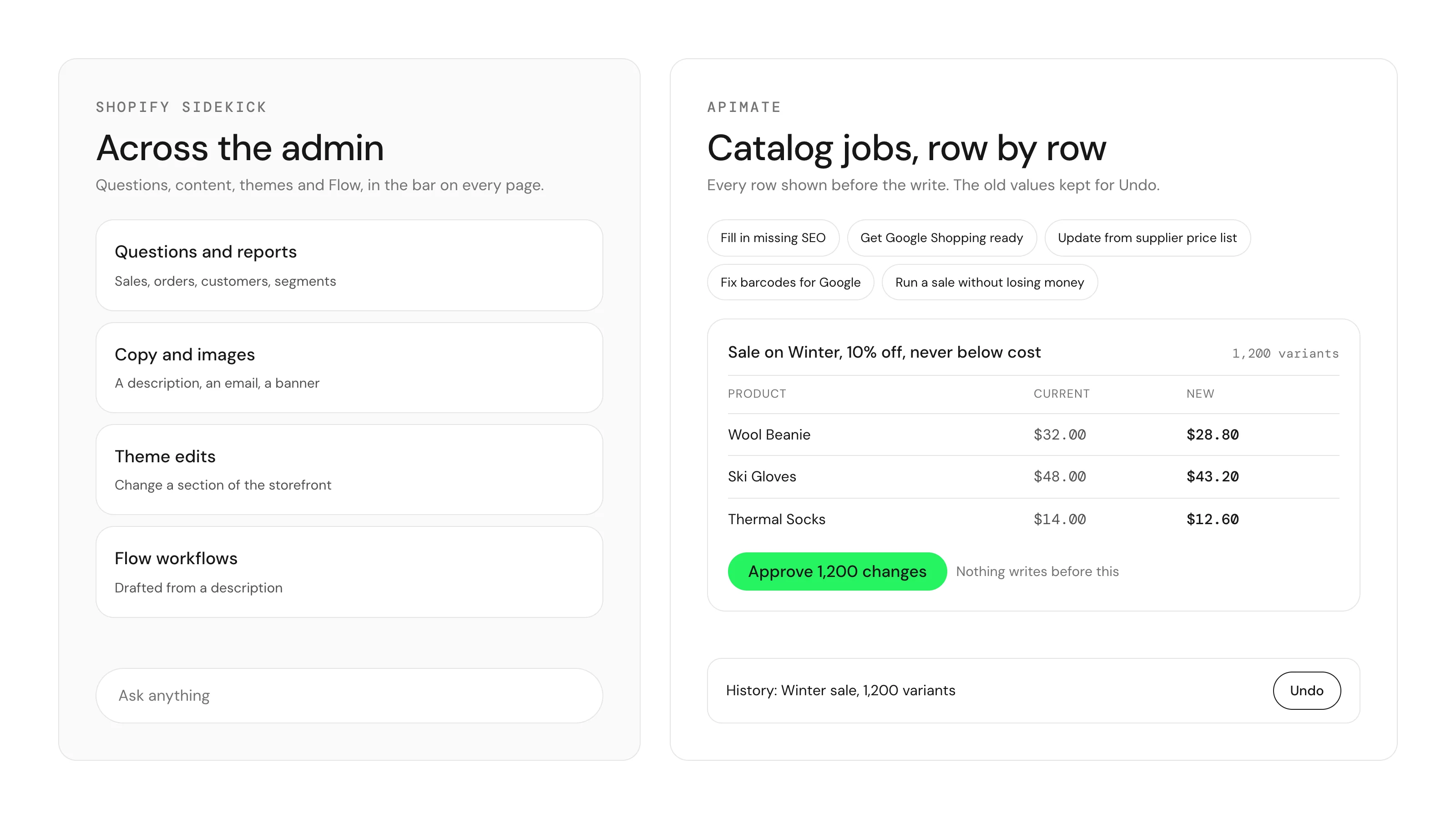
Sidekick now sits at the bottom of every page in the Shopify admin, so every merchant asks the same question: why install anything else? For questions, reports, copy, themes and Flow, you may not need to. ApiMate does one job Sidekick is not built around: a change across a large part of the catalog, shown row by row before it writes and reversible after.
| Feature | ApiMate | Shopify Sidekick |
|---|---|---|
| What it is | A catalog agent inside an app | Shopify's assistant across the whole admin |
| Best at | Changes across many products | Questions, reports, content, themes, Flow |
| Preview before a write | Every row: current value, new value, reason in scope | Asks for approval before it changes anything |
| Undo | Per job from history, with the replaced values | Not described in Shopify Help Center |
| Job size | No per-job product cap; large jobs run in batches | Shopify publishes no figure |
| Variants and metafields | Read and write, in the same plan as products | Independent test found no metafield support |
| Reads and audits | Any catalog question, no approval needed | Analytics, reports and data export |
| Content and themes | Per-row product text, previewed | Descriptions, images, emails, theme edits |
| Price | Free plan; paid plans by usage | Included with Shopify; limits vary by plan |
What Sidekick is
Sidekick is Shopify's AI assistant. It answers questions about sales and orders, builds reports and customer segments, writes product descriptions and emails, edits themes, drafts Flow workflows from a description, and can generate a custom app. Sidekick Pulse suggests things to look at without being asked. It is included with your Shopify plan.
In the new look of the Shopify admin, Sidekick moved from a side panel to a chat bar at the bottom of every page, including inside apps. It is the first place a merchant types a request.
Shopify states that Sidekick does not change anything without your approval. Its help pages describe memory of about three months of conversations and reusable Skills that you run by hand. As of 9 October 2026 they do not describe undo for product changes, a limit on how many products one request can change, or a history of the changes Sidekick made.
What ApiMate is
ApiMate is a Shopify app with a chat that reads and writes your catalog. You write the request as a sentence: "every product in the Winter collection: raise the price by 10 percent and round to .99, skip anything with a compare-at price". ApiMate finds the products, applies the rule and shows a preview with one row per variant: current price, new price and why the row is in scope.
Nothing writes until you approve that exact plan. After approval the job runs in batches and is saved in history with the values it replaced. Supported edits can be reverted with one instruction; irreversible operations are labelled before approval. Questions such as "which products have no SEO description?" are reads: they return a report and need no approval.
Five catalog jobs ApiMate does from one click
Some catalog jobs come up in almost every store, so ApiMate ships them as skills in the + menu of the chat. Pick one, add details if you want (a collection, a margin floor), and you get the same row preview and approval as any other request. The arithmetic in these jobs, margins, check digits and sale floors, is computed in code, not guessed by the model.
Sidekick has reusable skills too, and Shopify documents it filling in the SEO title and meta description on a product's form, one product at a time. ApiMate's distinction is the catalog workflow: rules checked in code, a preview of the affected rows and an Undo for supported edits. These five skills package that workflow for common catalog jobs.
- Fill in missing SEO: writes only the empty SEO titles (up to 60 characters) and meta descriptions (up to 155). Fields that are already filled stay as they are.
- Get Google Shopping ready: sets the Google product category metafield from Google's own taxonomy. Products too vague to classify are listed, not guessed.
- Update from supplier price list: attach a CSV or Excel file. Rows match by SKU or barcode, costs update, and a price goes up only where the margin at the new cost falls below your floor. Rows that matched nothing or matched several variants are reported.
- Fix barcodes for Google: checks GTINs the way Merchant Center reads them and repairs only what the check digit proves, such as a leading zero a spreadsheet dropped. Invalid and shared barcodes are listed.
- Run a sale without losing money: the old price becomes the compare-at price, variants already on sale are skipped, and no price goes below cost plus your margin floor. Undo restores the old prices and ends the sale.
The same job, both ways
A common catalog job: rewrite the SEO title and meta description for every product in three collections, about 1,200 products, to one pattern.
In Sidekick: you type the request in the bar. Sidekick asks for approval before it changes anything. An independent review from 14 September 2026 reported that Sidekick stopped after two records and offered no metafield support. Shopify Community threads from August 2026 describe Sidekick stopping halfway through a task, and the replies recommend checking each change by hand.
In ApiMate: you send the same sentence in the app. The preview lists all 1,200 rows with the current and new title and description. You approve once. If the new titles read badly, you revert the job from history.
Instruction
For every product in Winter, Ski and Snowboard: set the SEO title to "{product title} | {vendor}" and write a meta description under 155 characters from the product description.
| Step | Sidekick | ApiMate |
|---|---|---|
| Where you ask | The bar at the bottom of the admin | The chat in the app |
| Before the write | Approval | Row preview, then approval |
| 1,200 products | No published figure | One plan, run in batches |
| After the write | Check the products | Job in history with old values |
| Put it back | Not described by Shopify | Revert the job from history |
Sidekick facts are from Shopify Help Center and the sources above, checked 9 October 2026. Verify before relying on them.
Where Sidekick is the better tool
Sidekick is already in your admin, costs nothing extra and covers the whole store, not only the catalog. For most work outside bulk catalog changes, start there.
- Questions about sales, orders and customers, and reports built from them.
- Customer segments, Flow workflows and theme edits.
- Copy and images: a product description, a marketing email, a banner.
- A one-off change to one product or a few.
- Ideas from Sidekick Pulse about what to look at next.
Where ApiMate is the better tool
ApiMate is for the request where a mistake costs an afternoon: many products, a rule with exceptions, and values you may want back.
- Hundreds or thousands of products in one request. There is no per-job product cap; a large job changes the estimate and the run time.
- A preview of every row with the current value, the new value and the reason the row is in scope, before anything writes.
- Undo for supported edits from history. Jobs keep the values they replaced; irreversible operations are labelled before approval.
- Variants, metafields and inventory per location in the same plan as products.
- Catalog audits as reads: missing SEO fields, empty descriptions, products with no image, with no approval needed.
- Per-row generated text, such as meta descriptions or alt text, shown in the preview before it is written.
Preview and undo, compared
Both tools ask before they change anything. The difference is what you see before the write and what you can do after it.
| Question | Sidekick | ApiMate |
|---|---|---|
| What is shown before a write? | A request for approval | Row table: current, new, reason |
| Is approval required? | Yes, per Shopify | Every write waits; reads do not |
| What is saved for undo? | Not described by Shopify | Previous values per row, in job history |
| Partial failure? | Community reports of stopping halfway | Per-row report; revert covers the rows that wrote |
| Cannot be undone | Not described by Shopify | Deleted variants, created products; labelled in the preview |
Sidekick column from Shopify Help Center and Shopify Community, checked 9 October 2026. Verify before relying on it.
Pricing, compared
Sidekick is included with every Shopify plan. Shopify says usage limits vary by plan and does not publish them, so there is no separate bill and no published ceiling.
ApiMate has a free plan and paid plans by usage. The free plan runs audits and small jobs on any catalog size. The estimate for each job is shown before it runs, and a job cannot spend past the balance.
For questions and content, Sidekick costs nothing extra and is the obvious start. ApiMate is worth paying for when the catalog jobs are large or frequent enough that a row preview and an Undo save more time than they cost.
Scale: large catalogs
Shopify publishes no figure for how many products one Sidekick request can change. The independent review and the Community threads above report Sidekick stopping partway through multi-record jobs.
ApiMate has no per-job cap; a large catalog changes the estimate and the run time. The preview for a large job is the scope line first and paginated rows below. Long jobs report per batch and can be stopped partway, with the written rows revertable as a set.
Neither is the tool for a platform migration. That is a file job for Matrixify.
Running both
Most stores will keep both. Sidekick stays in the admin for questions, reports, content and themes. ApiMate takes the catalog jobs that need a row preview and a way back.
Inside the app the two sit close together: the ApiMate chat is the panel in the app, and the bar at the bottom of the screen is Sidekick. A request typed into the bar goes to Shopify, not to ApiMate.
Clean split
Sidekick answers and drafts across the store. ApiMate changes the catalog with a preview and an undo.
What to test before choosing
Run one real catalog job through each on a small scope. Then check these.
- Did you see every row with the current and new value before the write?
- Did the job finish for every product in scope, or stop partway?
- Did it touch variants and metafields when the request needed them?
- Can you put the old values back? Try it and check a few products.
- Can you find later what changed, when and with which values?
Where each tool stops
Sidekick does not talk to your customers. Shopify says its usage limits vary by plan and does not publish them.
ApiMate does not write marketing emails, edit themes or build Flow workflows. It accepts supplier price files for cost and margin jobs. For a platform migration or a general catalog import or export, use Matrixify.
Terms used on this page
- Sidekick bar: the chat field at the bottom of every page in the new Shopify admin.
- Plan: in ApiMate, the exact set of rows a request will change, shown before approval.
- Scope line: the count and description of the target products above the preview.
- Read: an ApiMate request that returns a report and writes nothing. No approval.
- Revert: putting back the values a job replaced, from the job history.
Frequently asked questions
Can Shopify Sidekick bulk edit products?+
It can change products after you approve. Shopify publishes no limit on how many products one request can change and does not describe undo for product changes. An independent review in September 2026 reported that it stopped after two records.
Is ApiMate a replacement for Sidekick?+
No. Sidekick covers the whole admin: questions, reports, content, themes and Flow. ApiMate covers bulk catalog changes with a row preview and undo. Most stores use both.
Can I undo a change made by ApiMate?+
Supported edits can be undone from job history using the saved previous values. Some operations, such as deleting variants, cannot be reversed. The preview labels those operations before you approve, and Undo reports any rows it could not restore.
Does ApiMate edit metafields and variants?+
Yes, in the same plan as product fields, with each row in the preview.
Sidekick is free. Why pay for ApiMate?+
ApiMate has a free plan for audits and small jobs. You pay when the catalog jobs get large, and the estimate is shown before each job runs.
I typed my request into the bar at the bottom. Why did ApiMate not answer?+
The bar at the bottom of the admin is Sidekick, which belongs to Shopify. The ApiMate chat is the panel inside the app.
Related pages
Try ApiMate on a real Shopify catalog
Install from the Shopify App Store. Every write is reviewed before it runs, and any change can be rolled back from the command history.